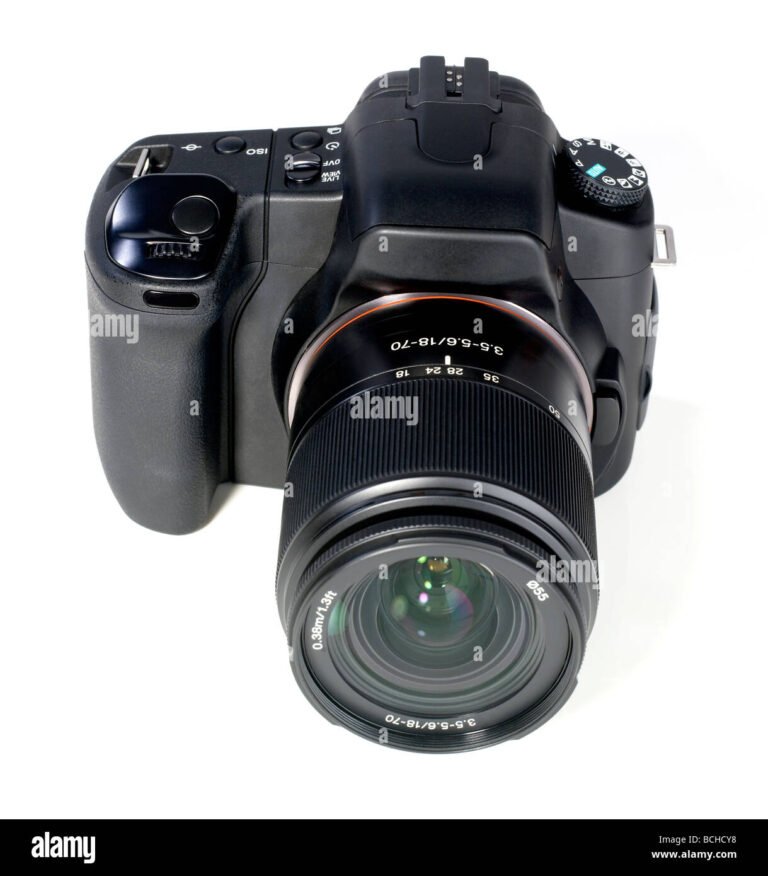
If you are new to photography, the many buttons and parts on a Canon camera can look confusing. The good news is that most parts have one simple job. Once you know what each part does, the camera becomes much easier to use.
This guide explains the **parts of a camera Canon** users commonly see on Canon EOS DSLR and mirrorless cameras. The exact layout can change by model, but the main ideas stay the same. You will learn what each part does, why it matters, and how it affects your photos.
A useful way to learn a camera is to hold it while reading. Find each part on your own Canon camera. Press only the controls you understand, and check your camera manual before changing an unfamiliar setting.
What Are the Main Parts of a Canon Camera?
The main parts of a Canon camera form a simple image-making system. The **lens** brings light into the camera. The **sensor** receives that light in a digital camera, while the shutter controls how long the sensor receives it.
The camera body holds the sensor, shutter, electronics, battery, controls, and other parts. The viewfinder or rear screen lets you see the scene and check camera settings. The memory card then stores the finished image.
Knowing these parts is the first step in learning the **parts of a camera Canon** users need to know. You do not need to memorize every button at once. Start with the parts that directly affect focus, light, framing, and image storage.

- ✦ Lens
The lens gathers and focuses light before it reaches the camera sensor.
- ✦ Image sensor
The sensor converts incoming light into digital image data.
- ✦ Shutter
The shutter controls the length of time light reaches the sensor.
- ✦ Viewfinder
The viewfinder lets you frame a subject through the camera.
- ✦ LCD screen
The rear screen displays live views, photos, menus, and camera settings.
- ✦ Memory card
The memory card stores photos and videos captured by the camera.
Canon DSLR and Mirrorless Cameras
Canon makes both DSLR and mirrorless cameras. A DSLR uses a mirror and an optical viewfinder system. A mirrorless camera does not use that mirror box and often uses an electronic viewfinder.
Because of this difference, some **parts of a camera Canon** users see may look different from one model to another. The basic functions remain similar, even when the body design changes.
- ✦ DSLR
A DSLR uses a reflex mirror and an optical viewfinder to show the scene through the lens.
- ✦ Mirrorless
A mirrorless camera sends the image from its sensor to the electronic viewfinder or screen.
Canon Camera Lens and Front Parts
The lens is one of the most important parts of a Canon camera. It controls how the scene looks before the image reaches the sensor. Different lenses can change the view, focus distance, background blur, and amount of light that enters the camera.
Canon cameras can use many lens types. A wide-angle lens can capture a large scene, while a telephoto lens can bring a distant subject closer. A macro lens is made for close-up work, and a standard zoom lens can cover many everyday subjects.
When studying the **parts of a camera Canon**, pay close attention to the lens controls. Small changes to focus, zoom, or aperture can have a clear effect on your photo.
- ✦ Front lens element
This is the glass at the front of the lens. It helps collect light from the scene.
- ✦ Focus ring
The focus ring lets you adjust focus on lenses that support manual focus.
- ✦ Zoom ring
A zoom ring changes the focal length on a zoom lens.
- ✦ Aperture
The aperture is an opening inside the lens that controls how much light enters and also affects depth of field.
- ✦ Lens mount
The mount connects the lens to the camera body and allows the camera and lens to communicate.
What Does the Lens Do?
The lens bends and focuses light so the camera can record a sharp image. Its focal length affects how much of the scene you see and how large a subject appears in the frame.
For example, a wide lens can be useful for landscapes, rooms, and group photos. A longer lens can work well for sports, wildlife, and subjects that are far away.
- ✦ Wide-angle lens
Useful when you want to fit more of a scene into the frame.
- ✦ Telephoto lens
Useful for distant subjects and many sports or wildlife scenes.
- ✦ Macro lens
Designed for detailed close-up photography.
Canon Camera Sensor, Shutter, and Image System
Inside a digital Canon camera, the sensor is the part that records the image. When you press the shutter button, light passes through the lens and reaches the sensor. The camera then turns that captured light into digital image data.
The shutter helps control exposure by controlling how long the sensor is exposed to light. A fast shutter speed can help freeze movement. A slow shutter speed can create motion blur when the camera or subject moves.
These parts work closely with the aperture and ISO setting. Together, shutter speed, aperture, and ISO form the basic exposure controls used by photographers.

- ✦ Image sensor
The sensor receives light and turns it into electronic data that becomes a digital photo.
- ✦ Shutter
The shutter controls exposure time. Its speed can affect motion blur and image brightness.
- ✦ Image processor
The camera processor handles image data and helps create the final photo file.
- ✦ Autofocus system
The autofocus system helps the camera find and maintain focus on a subject.
How Aperture, Shutter Speed, and ISO Work Together
Aperture controls the size of the opening in the lens. Shutter speed controls exposure time. ISO controls how strongly the camera processes the sensor signal for a given exposure.
A simple example is an indoor family photo. You may need a wider aperture, a suitable shutter speed, and enough ISO to get a bright image without too much blur or noise. Modern Canon cameras can handle much of this automatically, but learning the controls gives you more creative control.
- ✦ Aperture
Changes the lens opening and affects both light and depth of field.
- ✦ Shutter speed
Changes exposure time and affects how motion appears.
- ✦ ISO
Changes the camera’s sensitivity setting and can affect image noise.
Canon Camera Viewfinder, LCD Screen, and Controls
The back and top of a Canon camera contain many controls. These controls let you change shooting modes, focus settings, exposure, menus, playback, and other options. You do not need to learn every button before taking good photos.
The viewfinder is used to frame the subject without relying on the rear screen. On many Canon DSLR cameras, the optical viewfinder shows the scene through the lens. On Canon mirrorless models, an electronic viewfinder can show a digital preview of the scene.
The LCD screen is useful for live view, playback, menus, and settings. It can also help when you want to shoot from a low or high angle, especially on models with an adjustable screen.

- ✦ Viewfinder
Used to frame and compose a photo while looking through the camera.
- ✦ LCD monitor
Used to view photos, menus, live view, and many camera settings.
- ✦ Mode dial
Lets you choose a shooting mode such as Auto, Program, Aperture Priority, Shutter Priority, or Manual, depending on the model.
- ✦ Shutter button
Half-pressing it often starts focusing and metering. A full press captures the image.
- ✦ Control dial
Used to change settings such as shutter speed, aperture, or other values depending on the selected mode.
- ✦ Menu buttons
Open camera settings for image quality, autofocus, playback, wireless features, and other functions.
Why the Shutter Button Has Two Stages
On many Canon cameras, the shutter button has a half-press and a full-press action. A half-press can activate autofocus and exposure metering. A full press takes the photo.
This simple habit helps you focus before you capture the image. It is one of the first controls worth practicing when learning the **parts of a camera Canon** users operate every day.
- ✦ Half press
Usually activates focusing and exposure measurement.
- ✦ Full press
Releases the shutter and captures the photo.
Canon Camera Battery, Memory Card, and Connection Ports
A camera needs power and storage to work as a practical digital tool. The battery supplies power to the camera body, lens electronics, screen, autofocus system, and other features. The memory card stores photos and videos after you capture them.
Canon models can use different battery types and memory card formats. Always check the manual for your exact camera before buying a replacement battery or card.
Connection ports also vary by model. A Canon camera may include ports for USB, HDMI, a microphone, headphones, or other accessories. These ports can help with file transfer, video work, external audio, and camera control.

- ✦ Battery compartment
Holds the rechargeable battery that powers the camera.
- ✦ Memory card slot
Holds the card used to save photos and videos.
- ✦ USB port
Can support data transfer, charging, or other functions depending on the Canon model.
- ✦ HDMI port
Can send video and other display signals to compatible equipment on supported models.
- ✦ Microphone and headphone ports
Some Canon cameras provide ports for external audio recording and monitoring.
How to Care for These Parts
Keep the battery contacts and memory card area clean and dry. Do not force a card into its slot. If a card does not fit, remove it and check the direction and card type.
For travel, many U.S. photographers carry a spare battery and a second memory card. This is especially useful for weddings, sports, vacations, and long outdoor shoots where charging may not be easy.
- ✦ Protect the battery
Store batteries safely and use a charger designed for the correct Canon battery.
- ✦ Protect the memory card
Back up important photos and safely eject or remove the card when appropriate.
Canon Camera Flash, Hot Shoe, and Other Useful Parts
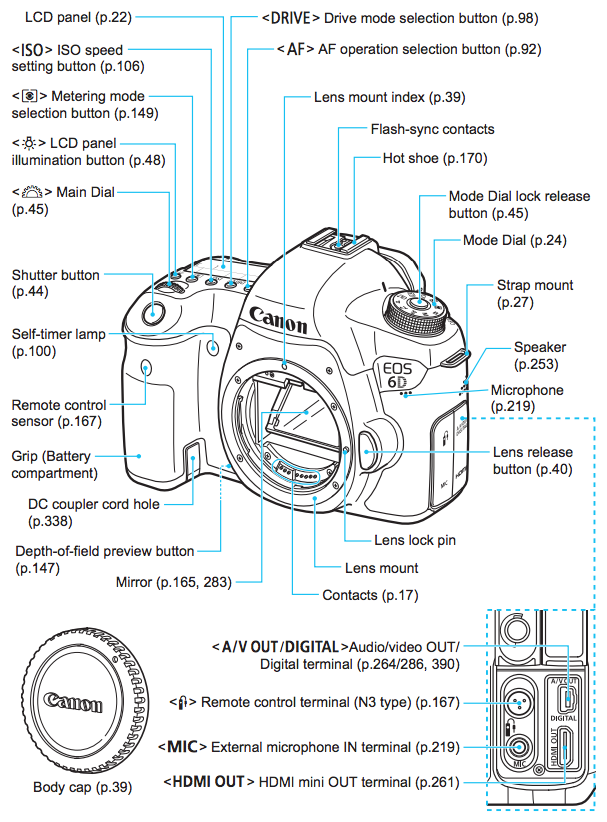
Many Canon cameras include features that help with difficult lighting and accessories. A built-in flash may help in some low-light situations, while the hot shoe can hold a compatible external flash or other accessory.
The tripod socket is another small part with a big practical role. It lets you attach the camera to a tripod, which can help with landscapes, night photos, studio work, video, and long exposures.
Other parts can include a strap mount, speaker, microphone, autofocus-assist features, wireless controls, and weather-resistant seals. The exact features depend on the Canon model.

- ✦ Built-in flash
Provides extra light on Canon models that include a built-in flash.
- ✦ Hot shoe
Provides a mounting point for compatible accessories such as an external flash.
- ✦ Tripod socket
Lets you attach the camera to a tripod or compatible support.
- ✦ Strap mounts
Provide attachment points for a camera strap.
- ✦ Speaker
Lets the camera play recorded sound or system sounds on supported models.
Which Parts Matter Most for Beginners?
Beginners often try to learn every button at once. That can make photography feel harder than it needs to be. Start with the lens, shutter button, mode dial, viewfinder or screen, control dial, playback button, and menu button.
Once those controls feel familiar, learn aperture, shutter speed, ISO, autofocus modes, and exposure compensation. This step-by-step approach makes the **parts of a camera Canon** lesson much easier to remember.
- ✦ Start with framing
Learn to use the viewfinder or screen to place your subject in the frame.
- ✦ Learn focus
Practice half-pressing the shutter button and selecting a useful autofocus area or subject mode.
- ✦ Learn exposure
Study aperture, shutter speed, and ISO after basic camera handling feels natural.
How All the Parts of a Camera Canon Work Together
A Canon camera works as a chain of simple steps. Light starts with the subject, enters the lens, passes through the optical system, and reaches the image sensor. The camera then processes the data and saves the image to the memory card.
The photographer controls this process with the camera buttons and settings. Focus controls help decide what should look sharp. Aperture, shutter speed, and ISO help control exposure and the look of the final photo.
This is why learning the **parts of a camera Canon** users handle is more useful than simply memorizing names. When you know what each part does, you can make better choices when a scene becomes bright, dark, fast, close, or far away.
- ✦ Step 1: Compose
Use the viewfinder or LCD screen to decide what belongs in the frame.
- ✦ Step 2: Focus
Use autofocus or manual focus to make the important subject sharp.
- ✦ Step 3: Set exposure
The camera or photographer sets aperture, shutter speed, and ISO.
- ✦ Step 4: Capture
Press the shutter button to record the image.
- ✦ Step 5: Process
The camera processes the sensor data into a photo file.
- ✦ Step 6: Store
The finished file is saved to the memory card.
A Simple Example: Taking a Family Photo
Imagine taking a family photo at a U.S. park on a sunny afternoon. You first use the lens to choose your view. You then place the people in the frame, focus on the group, and check the exposure.
The camera uses the lens, sensor, shutter, processor, controls, and memory card in a short sequence. You only press a few buttons, but many camera parts work together behind the scenes.
- ✦ Frame the group
Use the lens and viewfinder or screen to fit everyone into the composition.
- ✦ Check focus
Place focus on the people and confirm that the important subjects are sharp.
- ✦ Take the photo
Press the shutter button and let the camera record the image.