
Travel vloggers in the United States use several types of cameras, not one single model. The most common choices are small mirrorless cameras, pocket gimbal cameras, action cameras, and smartphones. For many US travelers, the best all-around pick is a compact camera that has strong autofocus, a wide lens, a flip screen, good sound, and USB charging.
Popular examples include:
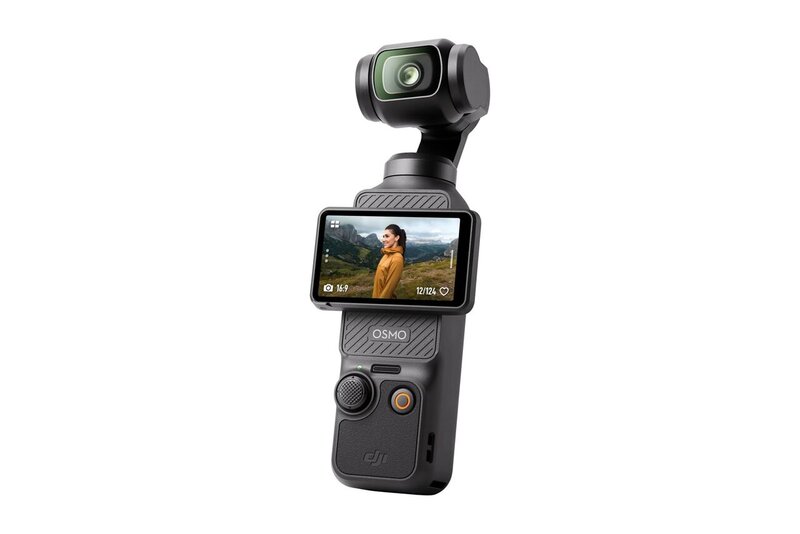
- DJI Osmo Pocket 3 for smooth walking videos
- Sony ZV-1 II for compact, high-quality vlogging
- Sony ZV-E10 II for interchangeable lenses
- Canon PowerShot V10 for simple, low-cost video
- GoPro HERO13 Black for outdoor and water footage
- Insta360 X4 for 360-degree and hands-free shots
- A recent iPhone or Samsung Galaxy for convenience
The right choice depends on your travel style, budget, luggage space, and need for image quality.

What cameras do travel vloggers use most often?
Travel vloggers usually choose cameras that are small, fast to use, and easy to carry through airports, city streets, parks, and hotels. They also need dependable focus and clear sound because travel scenes change quickly.
The main camera types are:
| Camera type | Best for | Main strength | Main limit |
|---|---|---|---|
| Pocket gimbal camera | Walking tours and city videos | Very smooth footage | Small sensor and limited lens options |
| Compact vlogging camera | Daily travel videos |
Good image quality in a small body | May need a grip or small tripod |
| Mirrorless camera | Cinematic travel films | Better low-light quality and lens choice | Larger and more costly |
| Action camera | Adventure travel | Tough body and wide view | Less natural background blur |
| 360 camera | Creative travel clips | Reframe the shot later | Editing takes more work |
| Smartphone | Casual vlogs and quick posts | Always available | Heat, battery, and audio limits |
A camera does not make a travel vlog successful by itself. A clear story, steady framing, useful audio, and good editing often matter more than a larger sensor.
Many creators also carry a second camera. For example, they may use a mirrorless camera for planned scenes and a GoPro for rain, skiing, biking, or underwater footage.
The best camera for most travel vloggers
The DJI Osmo Pocket 3 is one of the strongest choices for travelers who want smooth handheld video in a very small package. Its built-in three-axis gimbal helps reduce shake while walking. It also has a rotating screen and a 1-inch sensor.
The Sony ZV-1 II is a better fit for travelers who want a small camera with a conventional lens and strong autofocus. Its wide-angle lens suits talking-to-camera clips, hotel room tours, and street scenes.
The Sony ZV-E10 II suits creators who want to change lenses as their channel grows. You can use a wide lens for self-recording, a standard lens for interviews, or a telephoto lens for distant details. The trade-off is greater size, cost, and setup time.
A simple decision looks like this:
- Choose the DJI Osmo Pocket 3 if walking stability is your top need.
- Choose the Sony ZV-1 II if you want a compact camera with a built-in lens.
- Choose the Sony ZV-E10 II if you want lens changes and more control.
- Choose the GoPro HERO13 Black if your trips include action or water.
- Choose your phone if speed and low cost matter most.
These are category-based recommendations. A creator’s exact camera may change with the trip, sponsor work, location, or video style.

Why travel vloggers choose small cameras
Small cameras reduce friction. A camera that fits in a jacket pocket is more likely to be used than one that stays in a hotel bag.
Travel creators often need to record in short windows. A street performer may leave. A train may arrive. Light may change behind a building. A fast camera lets the creator capture the moment without a long setup.
Small cameras also draw less attention. This can help in busy places such as New York City, Los Angeles, Chicago, or Washington, DC. It does not remove the need to follow local rules or respect private spaces.
Size is not the only reason. Small vlogging cameras often include features made for solo creators:
- A screen that faces forward
- Face and eye autofocus
- A built-in microphone
- A microphone input
- USB-C charging
- Video stabilization
- Simple exposure controls
- A small tripod mount
A larger mirrorless camera can produce cleaner images in dark scenes. Yet the extra quality may not matter if the camera is hard to carry, slow to set up, or too obvious in a crowded place.
Camera features that matter most for travel vlogging
Autofocus
Reliable autofocus helps keep your face sharp while you walk or speak. Look for face detection and eye detection. These features are useful when you cannot watch the screen during filming.
Autofocus can still fail in low light, behind glass, in crowds, or when another object crosses the frame. Tap the screen or use a simpler focus mode when needed.
A wide lens
A wide view makes it easier to show your face and the place around you. It helps in small hotel rooms, narrow streets, and car interiors.
A camera with a very wide lens may make faces near the edge look stretched. A moderate wide lens often gives a more natural look. Digital stabilization can also crop the image, so the usable view may be narrower than the lens specification suggests.
Stabilization
Stabilization reduces small hand movements. It does not remove every bump or turn a fast walk into a smooth tracking shot.
There are three common forms:
- Optical stabilization: The lens or sensor moves to reduce shake.
- Electronic stabilization: Software crops and adjusts the video.
- Mechanical gimbal stabilization: A motor keeps the camera level.
A gimbal often gives the smoothest walking footage. An action camera may be easier to use because it has no moving gimbal parts.
Audio
Poor sound can make good video hard to watch. Wind, traffic, air conditioners, and crowds can cover speech.
A camera with a microphone input gives you more options. You can use a small wireless microphone or a compact wired microphone. Some cameras also support digital microphones through a compatible accessory shoe or USB connection.
A basic audio setup should include:
- A microphone close to your mouth
- A wind screen for outdoor use
- A short test clip before a long recording
- A backup recording when the scene matters
Do not assume that a camera’s built-in microphone will work well outdoors. Test it in the same type of place where you plan to film.
Battery life and charging
Travel videos use power quickly. A bright screen, autofocus, stabilization, and wireless connections all draw energy.
USB-C charging is useful in airports, cars, hotels, and portable power banks. Carry at least one spare battery for cameras that do not support useful charging while recording. Check the camera manual before using a power bank during long recording sessions.
Heat control
Small cameras have less room for heat to escape. Long clips in hot weather can cause a camera to stop recording or reduce its performance.
Heat risk rises when you use:
- High-resolution video
- High frame rates
- Direct sun
- An enclosed case
- External power
- Wireless connections
Test long recording modes at home before relying on them during a trip.
Best camera choices by travel style
For walking tours and city vlogs
A pocket gimbal camera is often the easiest choice. The DJI Osmo Pocket 3 can keep footage smooth while you walk through a market, museum, or city street.
A compact camera such as the Sony ZV-1 II can also work well. It gives you a more familiar camera shape and a built-in zoom lens.
For cinematic travel videos
A mirrorless camera gives you more control over lenses, depth of field, and low-light work. Cameras such as the Sony ZV-E10 II or Sony a6700 can suit creators who plan shots and edit carefully.
Use a wide lens for landscapes and self-recording. Use a faster lens, such as a lens with a wide aperture, for evening scenes. Remember that extra lenses add weight and cost.
For hiking and adventure travel
An action camera is usually the safer choice. GoPro HERO cameras are designed for wide, first-person footage and can handle conditions that may be risky for a larger camera.
An action camera may show more distortion and less detail in dark scenes. It also may not produce the soft background blur that some creators want.
For snorkeling, boating, and beach trips
Use a camera with the correct waterproof rating or a manufacturer-approved housing. Do not assume that a water-resistant camera is safe for every depth, saltwater condition, or duration.
Rinse equipment with fresh water after exposure to salt or sand. Keep ports closed and inspect seals before use.
For family and casual travel videos
A smartphone may be enough. Modern phones can record high-resolution video, stabilize handheld clips, and process difficult light with automatic software.
A phone is also easy to back up and edit. Its main limits may include storage, battery drain, heat, and weaker sound in windy places.
For 360-degree travel videos
A 360 camera lets you record the whole scene and choose the viewing angle later. This can create floating-camera effects and unusual walking shots.
The trade-off is a more complex editing process. You must reframe the video before exporting a normal widescreen clip.
A simple travel vlogging setup
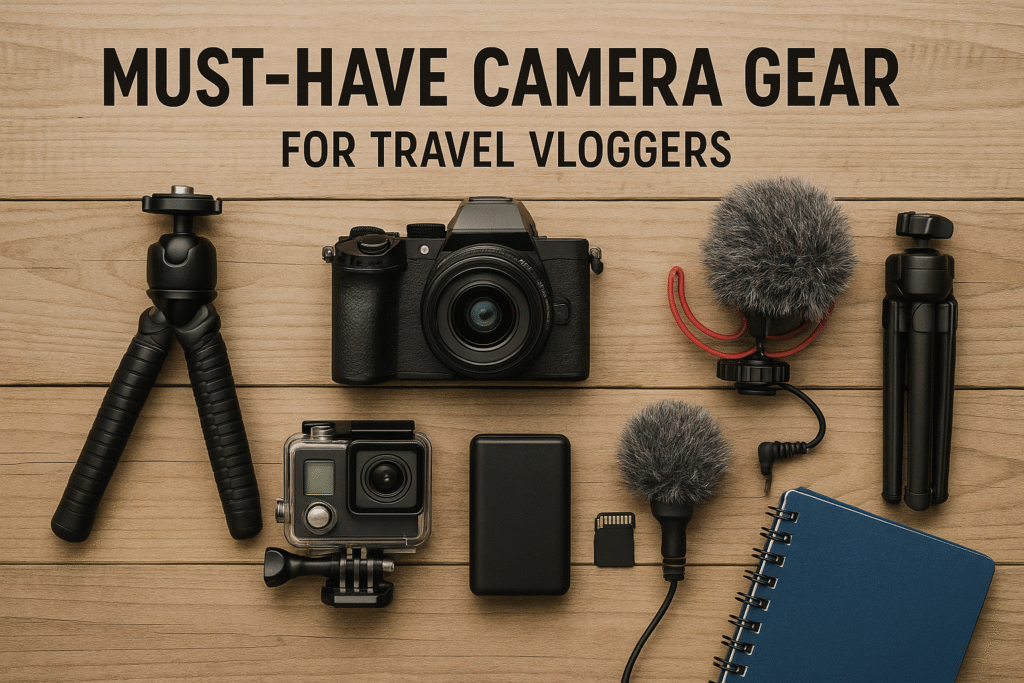
You do not need a large kit to begin. A practical setup can include:
- A camera with a forward-facing screen.
- One spare battery or a power bank.
- A small tripod or hand grip.
- A microphone and wind screen.
- Two or more memory cards.
- A protective pouch.
- A way to back up footage.
Choose memory cards that meet the speed class required by your camera. Check the camera manual before buying. Some high-bitrate video modes need faster cards.
A small tripod helps with hotel introductions, meal shots, and locked-off landscape clips. Use it where tripods are allowed. Do not block walkways or create a hazard in busy public places.
A hand grip can make a small camera easier to hold. It may also provide better control than holding the camera by its body.
How much should you spend on a travel vlog camera?
Your budget should include accessories, storage, and backup power. The camera body is only part of the cost.
| Budget level | Typical setup | Good fit |
|---|---|---|
| Low | Smartphone or basic compact camera | Beginners and casual clips |
| Mid | Pocket gimbal, action camera, or compact vlogging camera | Regular travel creators |
| Higher | Mirrorless body, lens, microphone, and support | Planned and cinematic videos |
A hypothetical mid-range budget might look like this:
- Camera: $700
- Spare battery: $60
- Memory cards: $40
- Microphone: $100
- Small tripod: $40
- Case: $30
That totals about $970 before tax. Actual US prices change by model, sales, bundles, and stock. Check the current manufacturer and major retailer prices before buying.
Do not spend more on a camera if your current problem is sound, shaky footage, or poor planning. A microphone or small tripod may improve your videos more than a new body.

Camera settings for travel vlogging
Start with simple settings. You can add control as you gain experience.
For normal talking videos:
- Use 4K at 24, 25, or 30 frames per second when you want detail and a standard look.
- Use 60 frames per second when you want smoother motion or slow-motion options.
- Use a shutter speed near twice the frame rate when lighting allows.
- Set white balance so colors do not shift between clips.
- Keep the face or eye autofocus mode active.
- Avoid extreme digital zoom.
The best frame rate depends on your editing plan. A 30 fps project is a simple choice for online video. A 24 fps project can create a more film-like motion style, but it does not automatically make footage cinematic.
Use 10-bit or log recording only if you know how to edit and color-correct it. These modes may create larger files and need more storage. They can also look flat until processed.
Common mistakes travel vloggers make
Buying for resolution alone
More pixels do not fix poor sound, bad light, or missed focus. Look at the complete system.
Carrying too much gear
Extra lenses, lights, batteries, and supports can slow you down. Pack only what matches your trip.
Ignoring audio
Viewers may forgive a soft image. They often stop watching when speech is hard to understand.
Failing to test the camera
Record a five-minute test before leaving. Check focus, sound, stabilization, battery use, file size, and heat.
Using a camera where filming is restricted
Airports, museums, government buildings, performances, and private businesses may have rules about cameras. Ask permission when needed. Avoid filming people closely without consent, especially children.
Losing the footage
Back up important clips during the trip. A simple plan is to keep one copy on the camera card and another copy on a laptop, portable drive, or secure cloud service. Do not format the card until you confirm the backup works.
Are smartphones good enough for travel vlogging?
Yes. A smartphone is good enough for many travel vlogs, especially when the video is made for short social posts or quick updates.
Phones offer strong automatic exposure, built-in editing tools, and fast sharing. They also avoid the need to carry a second battery system or memory card reader.
A dedicated camera becomes more useful when you need:
- Better low-light control
- Longer recording sessions
- A real microphone input
- A natural background blur
- A stronger optical zoom
- More reliable handling
- Interchangeable lenses
- A separate device for filming and communication
The best test is simple: record the same scene with your phone and planned camera. Compare focus, sound, skin tones, stabilization, battery use, and how easy each device is to carry.
Which camera should a beginner buy?
A beginner should choose based on the type of video they plan to make.
For a simple recommendation:
- Choose a smartphone for the lowest cost and fastest start.
- Choose the DJI Osmo Pocket 3 for smooth walking videos.
- Choose the Sony ZV-1 II for compact, polished vlogging.
- Choose the Sony ZV-E10 II if you want to build a lens-based system.
- Choose a GoPro HERO13 Black for sports, hiking, and water use.
- Choose an Insta360 X4 if you want to reframe 360-degree footage later.
Before buying, confirm the current US price, warranty, included accessories, memory-card requirements, and return policy. Product versions and bundles can change.
The best camera is the one you can carry, operate, charge, and protect during the entire trip.

Frequently asked questions
Do travel vloggers use DSLR cameras?
Some do, but mirrorless cameras are now often more practical for video. They can offer strong image quality and interchangeable lenses with less bulk than many older DSLR systems. A DSLR can still work if the creator already owns suitable lenses and accessories.
Is a GoPro better than a mirrorless camera for travel?
A GoPro is better for action, rain, biking, skiing, and wide first-person footage. A mirrorless camera is usually better for low light, interviews, lens control, and a more natural image. Neither is better for every trip.
Do travel vloggers carry two cameras?
Some carry two or more cameras. A second camera can reduce lens changes and provide backup footage. It also adds weight, charging needs, storage needs, and risk of loss. Beginners usually benefit from learning one camera first.
What lens is best for travel vlogging?
A wide or standard-wide lens is the most useful starting point. It can show the creator and the location in the same frame. The exact focal length depends on the camera sensor and how far the camera is held from the face.
How do travel vloggers keep cameras safe?
They use a padded pouch, keep cameras away from loose sand and water, close ports before exposure, and back up footage during the trip. In crowded areas, keep the camera secured with a wrist strap or suitable bag. Never leave expensive gear unattended in a vehicle.
What camera do travel vloggers use at night?
Many use a mirrorless camera with a fast lens because its larger sensor can help in dim scenes. A modern smartphone or compact camera can also work well with steady support and good available light. No camera can replace adequate light in a very dark location.
Sources and verification notes
The camera features discussed here should be checked against the current US product pages and manuals before purchase. Manufacturer documentation is the best source for specifications, supported recording modes, waterproof limits, charging rules, and accessory compatibility.
Useful primary sources include:
- DJI Osmo Pocket 3 official product page
- Sony ZV-1 II official product page
- Sony ZV-E10 II official product page
- Canon PowerShot V10 official product page
- GoPro HERO13 Black official product page
- Insta360 X4 official product page
Specifications, prices, software support, and included accessories can change. Treat product claims as model-specific rather than universal.

Conclusion: choose the camera that fits your trip
Most travel vloggers use compact gear because it is easy to carry and quick to operate. A pocket gimbal camera is ideal for smooth walking footage. A compact vlogging camera offers a strong balance of size and quality. A mirrorless camera gives more control. An action camera handles rough conditions. A smartphone remains the easiest starting point.
Start with the scenes you want to record. Then choose the smallest camera that can handle those scenes well. Add a microphone, spare power, and a backup plan before spending money on a larger camera.
Recent Posts
Wondering what camera do most vloggers use? Compare popular vlogging cameras, key features, and budget-friendly options before you buy.
Find the best blogger camera for sharp photos, smooth video, and effortless content creation. Compare features and choose the right camera today.