
In the United States, most vloggers do not use one single camera model. The most common choices are smartphones, compact cameras, and small mirrorless cameras. Among dedicated vlogging cameras, Sony models such as the Sony ZV-1, ZV-1 II, ZV-E10, and ZV-E10 II are widely used because they offer strong autofocus, a flip screen, good video quality, and simple controls.
The best choice depends on how you vlog. A phone may be enough for short videos and travel. A compact camera works well for walking tours and daily content. A mirrorless camera makes more sense when you want interchangeable lenses, better low-light control, or a more polished look.
There is no reliable public census of every U.S. vlogger’s camera. Therefore, “most vloggers use” should be understood as a market pattern, not an exact sales ranking.

The short answer: Which cameras do vloggers use most?
Most vloggers use one of these camera types:
- A smartphone for convenience, live content, and short-form video.
- A compact camera such as the Sony ZV-1 series or Canon PowerShot G7 X Mark III.
- An entry-level mirrorless camera such as the Sony ZV-E10 series, Canon EOS R50, or Nikon Z30.
- An action camera such as a GoPro for outdoor, sports, and point-of-view videos.
- A cinema or professional mirrorless camera for studio work, commercial content, and high-end productions.
For many new vloggers, the Sony ZV-1 or Sony ZV-E10 series is the most recognizable dedicated-camera choice. The ZV-1 is small and ready to use. The ZV-E10 offers interchangeable lenses and more room to grow.
However, popularity does not automatically make a camera right for you. A camera that looks ideal on a studio desk may be awkward to carry through New York City, Los Angeles, Chicago, or a national park.

Why Sony cameras are common among vloggers
Sony’s vlogging cameras are popular because they combine several features that make solo filming easier.
Fast autofocus
Sony cameras use strong subject-detection autofocus on many current models. This helps keep a face or eye sharp while the vlogger moves toward or away from the camera.
Autofocus is especially useful when:
- You film yourself without a camera operator.
- You change distance from the camera.
- You hold products close to the lens.
- You record in a busy street or event.
- You use a wide aperture that creates a shallow focus area.
Sony’s product pages document features such as face-priority autofocus and product showcase modes on selected models. The exact feature set depends on the camera, firmware, and recording mode.
A side-opening screen
Many vloggers prefer a screen that flips to the side. This design lets you see yourself while the camera is mounted on a tripod or handheld grip.
A side-opening screen also leaves the camera’s top and side ports accessible. That matters when you connect:
- A microphone.
- Headphones, where supported.
- A USB cable.
- A small video light.
- A tripod or cage.
Built-in microphone features
The Sony ZV line is designed for video creators. Some models include a directional microphone capsule and a windscreen designed to reduce wind noise. These features can improve recorded speech in calm conditions.
They do not replace a dedicated microphone in every situation. Wind, traffic, crowds, air conditioners, and echo can still damage sound quality.
Small size
A small camera is easier to carry and less intimidating in public. This can make it more likely that you will record consistently.
That practical benefit is easy to overlook. A large camera can offer better image quality, but the best camera is often the one you are willing to bring with you.
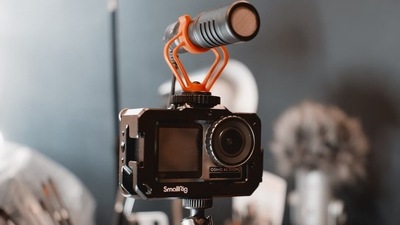
The most common vlogging camera choices by use
The following table compares common camera categories. It focuses on practical use rather than claiming an exact market-share ranking.
| Camera type | Common examples | Best for | Main strength | Main limitation |
|---|---|---|---|---|
| Smartphone | iPhone, Google Pixel, Samsung Galaxy | Short videos, travel, live content | Always available | Smaller controls and limited lens flexibility |
| Compact vlogging camera | Sony ZV-1, Sony ZV-1 II, Canon G7 X Mark III | Daily vlogs and travel | Small body with better camera controls | Fixed lens and smaller sensor |
| Entry mirrorless camera | Sony ZV-E10 II, Canon EOS R50, Nikon Z30 | YouTube and long-term growth | Interchangeable lenses | Requires more setup and accessories |
| Action camera | GoPro HERO series, DJI Osmo Action | Sports, cycling, water, first-person video | Tough body and wide view | Less control over low-light image quality |
| Full-frame mirrorless | Sony a7 series, Canon EOS R series, Nikon Z series | Studio, commercial, cinematic work | Strong low-light and lens options | Higher cost, weight, and complexity |
The biggest decision is not brand. It is whether you need a fixed lens or interchangeable lenses.

Best dedicated cameras for different types of vloggers
Sony ZV-1: Best small all-in-one choice
The Sony ZV-1 is a compact camera with a built-in zoom lens. It is attractive to vloggers who want more control than a phone but do not want to carry lenses.
It suits:
- Daily city vlogs.
- Food and travel videos.
- Indoor talking-head clips.
- Beginner YouTube channels.
- Handheld videos with a small grip.
Its fixed lens keeps the setup simple. You do not need to choose a lens before leaving home.
The trade-off is flexibility. You cannot replace the lens when your needs change. Its smaller body and sensor may also provide less low-light flexibility than a larger mirrorless camera.
Sony ZV-1 II: Best for a wider built-in view
The Sony ZV-1 II uses a wider-angle lens than the original ZV-1. That can help when you hold the camera at arm’s length or film in a small room.
It may fit you if:
- You vlog yourself while walking.
- You often work in tight indoor spaces.
- You want your surroundings in the frame.
- You prefer not to change lenses.
A wide lens can also make faces and nearby objects look larger at the edges. It is not always the best look for close-up portraits.
Sony ZV-E10 and ZV-E10 II: Best for upgrading over time
The Sony ZV-E10 series uses interchangeable lenses. This gives you more control over framing, background blur, low-light performance, and camera size.
It suits creators who want to:
- Start with one lens and add more later.
- Use a wide lens for handheld vlogging.
- Use a brighter lens for indoor filming.
- Build a studio setup.
- Keep using the same camera system as their channel grows.
The main cost is complexity. You must choose lenses, manage extra batteries or cards, and learn more settings.
The ZV-E10 II is a newer generation model than the original ZV-E10. Check Sony’s U.S. product page for current recording modes, power requirements, and accessory compatibility before buying.
Canon EOS R50: Best for creators who prefer Canon
The Canon EOS R50 is a small interchangeable-lens camera with a fully articulating screen and subject-detection autofocus. It can work well for talking-head videos, travel, and beginner YouTube production.
It may be a good fit when:
- You already own compatible Canon RF lenses.
- You prefer Canon’s menus and color style.
- You want a general-purpose camera for both photos and video.
- You need a viewfinder for still photography.
The EOS R50 is not built only for vlogging. That can be an advantage for people who want one camera for family photos, travel, and content.
Nikon Z30: Best for Nikon users who want a creator body
The Nikon Z30 is a compact mirrorless camera made with video creators in mind. It has a fully articulating screen and uses Nikon’s Z-mount lenses.
It can fit:
- Beginner creators who prefer Nikon.
- Desk-based video.
- Travel content.
- Users who want interchangeable lenses.
- People who already use Nikon Z equipment.
As with any mirrorless camera, the lens can affect the final result as much as the camera body. A weak or overly narrow lens can make handheld vlogging difficult even when the camera itself is capable.
GoPro and action cameras: Best for movement and rough conditions
Action cameras are common among vloggers who record skiing, cycling, hiking, boating, motorsports, and other active scenes.
They offer useful traits such as:
- Small size.
- Wide-angle views.
- Strong stabilization.
- Water-resistant or rugged designs, depending on the model and setup.
- Easy mounting on helmets, vehicles, and handlebars.
Their limits include small sensors, strong wide-angle distortion, and weaker performance in dark rooms. An action camera is often a poor replacement for a main indoor talking-head camera.

Is an iPhone better than a camera for vlogging?
For many U.S. creators, an iPhone or another modern smartphone is the most practical vlogging camera.
A phone may be better when:
- You need to publish quickly.
- You film vertical video for TikTok, Instagram Reels, or YouTube Shorts.
- You want simple editing and uploading.
- You do not want to carry a second device.
- You record in bright outdoor light.
A dedicated camera may be better when:
- You need a real optical zoom.
- You want to change lenses.
- You need a microphone input or more manual control.
- You want stronger background separation.
- You record long-form YouTube videos.
- You need more control over exposure and color.
The difference is not simply “phone versus camera quality.” Lighting, sound, framing, stabilization, and editing often affect perceived quality more than the camera body alone.
Apple’s iPhone technical specifications document video features for each current model. Those features vary by model and storage capacity. Android phones also differ widely, so compare the exact U.S. model rather than relying on the brand name.
What matters more than the camera brand?
The camera is only one part of a vlog setup. New creators often spend too much on the body and too little on sound and support.
Audio
Viewers may tolerate a soft image. They are less likely to tolerate unclear speech.
Useful audio options include:
- A wired lavalier microphone.
- A compact on-camera microphone.
- A wireless microphone system.
- A recorder placed close to the speaker.
Check whether the camera supports the microphone connection you plan to use. Some setups need a digital hot-shoe accessory, USB connection, or adapter.
Lens choice
For handheld vlogging, a wide lens helps include your face and background. A lens that is too narrow may force you to hold the camera far away.
For indoor filming, a bright lens can help you use a lower ISO or create background blur. A lower f-number usually means a wider aperture, but lens design, focus distance, and sensor size also affect the look.
Stabilization
Optical or electronic stabilization can reduce small hand movements. It cannot remove every bump, especially while walking.
For smoother footage, use:
- A small tripod grip.
- A gimbal when appropriate.
- A wider lens.
- A steady walking style.
- A fixed camera position for talking segments.
Electronic stabilization may crop the image. Check the camera manual for the exact crop and recording limits.
Lighting
A small LED light can improve a face more than a more expensive camera used in a dark room.
Place the light slightly above eye level and near the camera. Avoid placing a bright window directly behind you unless you want a backlit look.
Battery and storage
Video uses substantial battery power and storage space. Carry a spare battery or power bank when the camera supports charging during use.
Use memory cards that meet the camera’s documented speed class and capacity limits. Format cards in the camera when practical, and keep a backup of important footage.
How to choose the right vlogging camera
Use this simple process before buying.
1. Decide where you will film
Choose the main setting:
- Bedroom or home office.
- Car.
- Street.
- Travel location.
- Sports venue.
- Studio.
- Outdoor trail.
A studio vlogger may value a microphone input, screen, and lens options. A travel vlogger may value weight, battery life, and stabilization more.
2. Choose your recording format
Decide whether you mainly need:
- Horizontal video for standard YouTube.
- Vertical video for Shorts and social media.
- Both formats.
- Live streaming.
- Long recording sessions.
A camera that works well for horizontal video may need a different mount or workflow for vertical content.
3. Set a complete budget
Do not budget only for the camera body. Include:
- Lens.
- Memory card.
- Spare battery.
- Microphone.
- Small tripod or grip.
- Light.
- Camera bag.
- Extra storage.
A hypothetical $900 camera kit can quickly exceed $1,100 after adding a $150 microphone, $50 card, and $40 grip. The exact prices change, but the principle remains: compare complete kits, not body-only prices.
4. Check the essential features
Prioritize:
- Reliable autofocus.
- A screen you can see while filming.
- A microphone connection.
- Good battery access.
- Comfortable weight.
- Suitable lens options.
- Recording limits for your planned sessions.
- Compatibility with your computer or phone workflow.
5. Test the workflow before buying accessories
Confirm how you will move footage from the camera to your editing device. A camera can record excellent video but still create a frustrating workflow if files are large or difficult to transfer.
Common mistakes when buying a vlogging camera
Buying for image quality alone
A camera may produce sharp video but still be hard to use. If it has poor battery life, no useful screen, or weak audio support, it may slow down your work.
Using a narrow lens for handheld video
A standard or telephoto lens can make handheld framing difficult. Check the full-frame-equivalent focal length and test the working distance before buying.
Ignoring sound
Built-in microphones are useful for quick clips, but they can record handling noise, wind, and room echo. Plan your audio setup before you spend your entire budget on the camera.
Assuming 4K always looks better
4K can provide more detail and cropping room. It can also create larger files, use more battery, and place greater demands on your computer and storage.
Choose the format your editing system can handle. A clear 1080p video with good sound is often more effective than poorly recorded 4K.
Forgetting heat and recording limits
Some cameras may stop recording because of heat, battery limits, card limits, or file-size rules. Check the official manual for your exact model and recording mode.
Buying a camera without checking U.S. support
For U.S. buyers, confirm the warranty region, charger type, return policy, repair options, and software support. Gray-market products may have different warranty terms.
FAQ: What camera do most vloggers use?
Do most YouTubers use Sony cameras?
Sony cameras are common among YouTubers, especially compact ZV models and interchangeable-lens Alpha cameras. However, no public database proves that Sony is used by a majority of all YouTubers. Canon, Nikon, Panasonic, GoPro, DJI, Apple, and Samsung devices are also common.
Is the Sony ZV-1 good for beginners?
Yes. The Sony ZV-1 is simple to carry and includes a built-in zoom lens, flip screen, and creator-focused controls. It is a practical beginner choice when you do not need interchangeable lenses.
Is a phone good enough for vlogging?
A phone is good enough for many vloggers, especially for short-form video, travel clips, and fast publishing. Add a small microphone and tripod before replacing the phone with a dedicated camera.
Which camera is best for walking and talking videos?
A compact camera with a wide lens, reliable autofocus, and stabilization is usually the most practical choice. The Sony ZV-1 II, a wide-lens mirrorless setup, or an action camera can work depending on lighting and the desired look.
Should I buy a camera or microphone first?
If your current camera or phone already produces acceptable video, buy or improve the microphone first. Clear speech often creates a larger improvement than a modest camera upgrade.
Final recommendation
The camera most associated with modern vlogging is the Sony ZV series, but the right answer depends on your workflow.
- Choose a smartphone for speed and convenience.
- Choose a Sony ZV-1 or ZV-1 II for a small all-in-one camera.
- Choose a Sony ZV-E10 II, Canon EOS R50, or Nikon Z30 if you want interchangeable lenses and room to grow.
- Choose a GoPro or similar action camera for outdoor movement and rugged use.
- Choose a larger mirrorless camera only when you need its added control, lens options, or low-light capability.
Before you buy, record a short test in the place where you will actually vlog. Check the framing, sound, autofocus, battery use, and file transfer. That test will tell you more than a popularity list.
Recent Posts
Find the best blogger camera for sharp photos, smooth video, and effortless content creation. Compare features and choose the right camera today.
Find out what is the most popular vlogging camera and compare the best features, performance, and value for creating standout videos.