
For most people in the United States, the Sony ZV-E10 II is the best all-around camera for YouTube vlogging. It records high-quality 4K video, has strong autofocus, accepts interchangeable lenses, includes a microphone jack and headphone jack, and gives creators room to improve over time.
The best choice still depends on how you vlog:
- Best overall: Sony ZV-E10 II
- Best small point-and-shoot camera: Sony ZV-1 II
- Best for walking and travel: DJI Osmo Pocket 3
- Best Canon option: Canon EOS R50
- Best low-cost starting option: A recent smartphone paired with a microphone and small tripod
A camera does not make a YouTube channel successful by itself. Good light, clear sound, steady framing, and useful content usually matter more than buying the most expensive body.

Quick Answer: Which Camera Is Best for YouTube Vlogging?
The Sony ZV-E10 II is the strongest choice for most new and growing YouTubers. It combines a compact body with interchangeable lenses, reliable subject autofocus, a flip-out screen, and modern video features.
Choose another camera if your needs are more specific:
| Your main need | Best fit | Why |
|---|---|---|
| One camera for indoor and outdoor vlogs | Sony ZV-E10 II | Flexible lens system and strong video features |
| Simple camera with no lens buying | Sony ZV-1 II | Small body, built-in zoom lens, easy setup |
Walking, hiking, and travel footage |
DJI Osmo Pocket 3 | Built-in three-axis gimbal and tracking |
| Canon colors and simple controls | Canon EOS R50 | Good autofocus and an easy-to-use mirrorless body |
| Lowest total cost | Smartphone | You may already own one and can add better audio |
The “best” camera is the one that fits your filming style. A large camera that stays at home is less useful than a small camera you carry every day.

What Makes a Good YouTube Vlogging Camera?
A good vlogging camera must do more than record sharp video. It should make filming simple, support clear sound, and help you stay in focus while you move.
Autofocus
Autofocus keeps your face or subject sharp. This matters when you vlog alone because you cannot adjust focus while walking, talking, or demonstrating a product.
Look for:
- Face detection
- Eye detection
- Subject tracking
- A clear way to check focus on screen
Sony, Canon, and DJI all offer useful autofocus systems in the cameras listed in this guide. Performance can change with low light, fast movement, busy backgrounds, or a subject that briefly leaves the frame.
A flip-out screen
A side-hinged screen lets you see yourself while recording. It helps you check:
- Whether your face is in the frame
- Whether the camera is level
- Whether the background looks clean
- Whether bright windows are overexposing the image
- Whether a microphone or accessory blocks the view
A screen that flips upward or downward is less useful when you mount a microphone or light above the camera.
Good microphone support
Viewers may forgive soft video. They rarely tolerate poor sound.
A camera should have a microphone input if you plan to use an external microphone. A headphone jack is also useful because it lets you monitor sound while recording. This can reveal a loose cable, wind noise, clothing rustle, or a microphone that is not working.
Built-in microphones work for quick clips. For regular YouTube videos, an external microphone is usually a better first upgrade than a costly lens.
Stabilization
Stabilization reduces unwanted camera shake. It comes in several forms:
- Optical stabilization: The lens or sensor moves to reduce shake.
- Electronic stabilization: The camera crops the image and adjusts the frame.
- Mechanical gimbal stabilization: Motors physically keep the camera level.
A gimbal camera, such as the DJI Osmo Pocket 3, is useful for walking footage. A mirrorless camera may need a stabilized lens, a small tripod, or a grip.
Battery life, heat, and storage
Long videos require enough battery power and storage. A camera may stop recording because of:
- A full memory card
- A drained battery
- Excess heat
- A recording limit
- A slow or incompatible card
Check the manufacturer’s instructions before buying memory cards. For 4K video, use a card with the speed rating required by the camera.
Best Overall: Sony ZV-E10 II
The Sony ZV-E10 II is the best overall vlogging camera for most YouTube creators because it balances image quality, size, autofocus, and long-term flexibility.
It uses an interchangeable-lens design. This means you can begin with a small kit lens and later choose a wider lens, a low-light lens, or a lens with a more blurred background.
Why the Sony ZV-E10 II stands out
The camera offers:
- 4K video recording
- A side-opening vari-angle screen
- Sony face and eye autofocus
- An interchangeable Sony E-mount lens system
- A microphone input
- A headphone output
- USB streaming and charging features
- A compact body suited to handheld vlogging
The camera can record 4K at higher frame rates, but some high-frame-rate modes use a crop. A crop makes the view look closer. This matters when you hold the camera at arm’s length in a small room.
Who should buy it?
The Sony ZV-E10 II fits creators who want to:
- Film talking-head videos at home
- Record travel and lifestyle vlogs
- Use different lenses later
- Improve video quality beyond a phone
- Record themselves without a camera operator
- Build a small camera system over time
Its main limits
The body does not provide the same built-in mechanical stabilization as a gimbal camera. You may need a stabilized lens, a grip, or a small tripod for smoother walking footage.
The total cost can also rise after adding a lens, microphone, extra battery, memory card, and small light. For this reason, compare the cost of the full kit rather than the camera body alone.
Sony lists the camera’s features and compatible accessories on its official product and support pages:

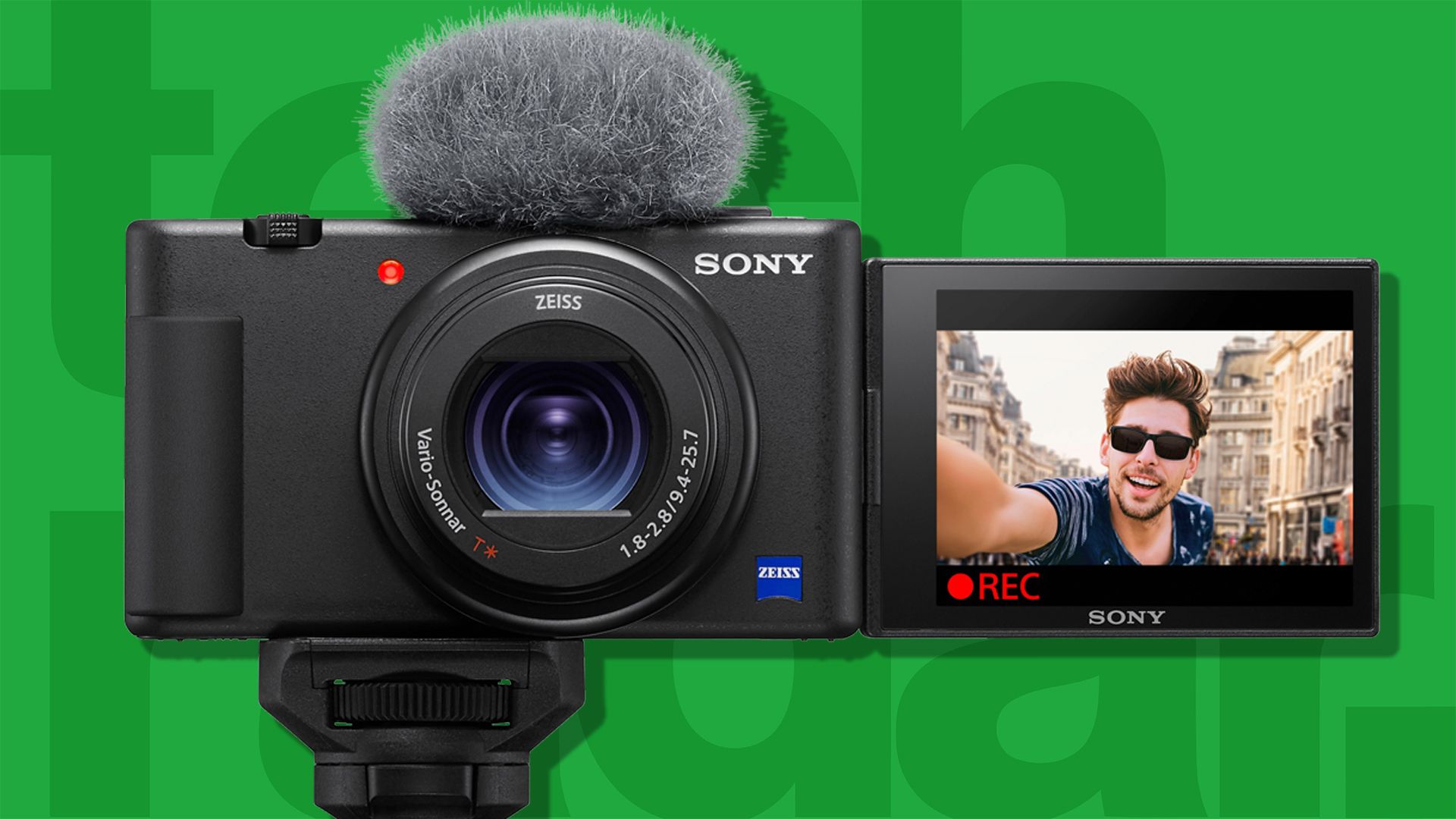
Best Compact Camera: Sony ZV-1 II
The Sony ZV-1 II is a strong choice for creators who want a small, simple camera with a built-in lens.
Its fixed zoom lens means you do not need to buy or change lenses. That makes it easier to carry and faster to set up than a mirrorless camera.
Why choose the ZV-1 II?
The camera is well suited to:
- City and travel vlogs
- Indoor talking videos
- Product demonstrations
- Short videos for YouTube and social platforms
- Creators who want a pocket-sized setup
It includes a side-opening screen, a built-in zoom lens, face-priority autofocus, and a built-in microphone with a windscreen. It also supports an external microphone through its microphone input.
The trade-off
The ZV-1 II uses a 1-inch sensor. This is larger than the sensor in many compact cameras but smaller than the sensor in most interchangeable-lens cameras.
Its lens is wide enough for many selfie videos, but electronic stabilization can crop the image. In a tight room, that crop may make the camera feel too close.
The fixed lens also limits future upgrades. You cannot replace it with a brighter lens or a wider lens when your needs change.
Best for Walking and Travel: DJI Osmo Pocket 3
The DJI Osmo Pocket 3 is the best option for smooth walking footage in a very small package.
Its built-in three-axis mechanical gimbal keeps the camera level as you move. This is different from electronic stabilization, which crops the video and digitally corrects movement.
Why the Pocket 3 works well for vlogging
The Pocket 3 offers:
- A compact design
- A rotating touchscreen
- Mechanical gimbal stabilization
- Face tracking
- A 1-inch camera sensor
- 4K video recording
- Optional wireless microphone support through compatible DJI accessories
It is especially useful for travel, food videos, walking tours, and day-in-the-life content.
What it does not replace
The Pocket 3 is not a full mirrorless camera system. You cannot change its lens. Its small body may also be less comfortable for long talking-head sessions if you want a traditional camera grip and larger accessories.
The gimbal has moving parts. Use care around sand, dust, rain, and impacts. Read DJI’s operating guidance before using it in harsh conditions.

Best Canon Option: Canon EOS R50
The Canon EOS R50 is a good choice for creators who prefer Canon’s menus, color, and lens system.
It is a small mirrorless camera with a flip-out screen, a microphone input, and Canon’s Dual Pixel CMOS autofocus. It can record 4K video and supports Canon RF-mount lenses.
Why the EOS R50 is worth considering
The camera can suit:
- Home studio videos
- Family and lifestyle channels
- Product videos
- Beginner mirrorless camera users
- Creators who may also take still photos
Its viewfinder can help in bright outdoor light, although many vloggers will use the rear screen instead.
Limitations for solo vloggers
The EOS R50 does not include a headphone jack for monitoring audio. That makes it harder to check sound during recording.
Its lens system is also different from Sony’s. Lens choice, price, and availability may matter more than small differences in camera specifications. If you already own Canon RF lenses, the EOS R50 becomes more attractive.

Sony ZV-E10 II vs. Sony ZV-1 II vs. DJI Pocket 3
These cameras solve different problems. The Sony ZV-E10 II gives you the most room to grow. The ZV-1 II is simpler. The Pocket 3 is steadier while walking.
| Feature | Sony ZV-E10 II | Sony ZV-1 II | DJI Osmo Pocket 3 |
|---|---|---|---|
| Camera type | Mirrorless | Compact camera | Gimbal camera |
| Lens | Interchangeable | Built-in zoom | Built-in lens |
| Sensor class | APS-C | 1-inch | 1-inch |
| Walking stability | Needs lens, grip, or tripod support | Electronic stabilization | Built-in mechanical gimbal |
| Screen | Side-opening | Side-opening | Rotating touchscreen |
| External microphone | Yes | Yes | Via compatible accessories |
| Headphone monitoring | Yes | Check the current configuration | Depends on setup |
| Best use | Long-term YouTube system | Easy everyday filming | Travel and walking videos |
| Main drawback | Higher system cost | Less upgrade flexibility | Limited lens and body system |
Sensor size is only one part of image quality. Light, lens choice, focus, exposure, compression, and editing also affect the final video.

How to Choose the Right Vlogging Camera
Use your filming habits to make the decision. Do not begin with the camera brand.
Choose the Sony ZV-E10 II if:
- You want one camera for several types of videos.
- You want to change lenses later.
- You need a headphone jack.
- You record indoors and outdoors.
- You want a camera that can grow with your channel.
Choose the Sony ZV-1 II if:
- You want a built-in lens.
- You value a small, simple setup.
- You do not want to study lenses.
- You mostly film short travel or lifestyle videos.
- You want to start recording quickly.
Choose the DJI Osmo Pocket 3 if:
- You walk while filming.
- You travel often.
- You want smooth movement without a separate gimbal.
- You prefer a very small camera.
- You record tours, events, or outdoor stories.
Choose the Canon EOS R50 if:
- You prefer Canon’s controls.
- You want a mirrorless camera for video and photos.
- You already own compatible Canon lenses.
- You do not need headphone monitoring during recording.
What Accessories Do You Need?
You can start with a camera, lens, battery, memory card, and microphone. Add accessories only when they solve a real problem.
Useful first accessories
-
External microphone
A wired or wireless microphone can improve speech clarity. Keep the microphone close to your mouth. -
Small tripod or grip
This helps with stable indoor shots and hands-free recording. -
Spare battery or USB power
Confirm that the camera supports charging or operation from USB while recording. -
Fast memory card
Match the card speed to the camera’s recording requirements. -
Small LED light
A soft light placed near eye level can improve a dark room. Avoid pointing a harsh light directly at your face. -
Lens with a wide view
A wide lens helps when you hold the camera close or film in a small room. Check the full-frame equivalent focal length, not only the lens number printed on the barrel.
A simple starter setup
For a basic indoor YouTube setup, use:
- Sony ZV-E10 II
- The included kit lens
- A wired or wireless microphone
- A small tripod
- A soft window or LED light
- One spare battery
- A suitable memory card
This setup is usually more useful than spending the entire budget on a camera body.

How to Set Up a Camera for YouTube Vlogging
Follow this sequence before recording a full video.
-
Set the video resolution.
Use 4K if your computer, storage, and editing software can handle it. Use 1080p if you need smaller files and faster editing. -
Choose the frame rate.
Use 24p or 30p for standard talking videos. Use 60p when you want smoother motion or plan to slow footage down. -
Turn on face or eye autofocus.
Test it before recording. Make sure the camera locks onto your face rather than the background. -
Set exposure.
Keep your face well lit. Avoid placing a bright window directly behind you unless you want a silhouette. -
Check white balance.
Auto white balance is convenient. A fixed setting may keep colors more consistent across several clips. -
Connect and test the microphone.
Record a short clip. Listen with headphones before filming the entire video. -
Frame the shot.
Leave a little space above your head. Check the edges of the frame for clutter, bright lights, or unwanted objects. -
Record a test clip.
Confirm picture, focus, audio, and stabilization. A 10-second test can prevent the loss of an hour-long recording.
A setup works when your face stays sharp, your speech is clear, your exposure remains usable, and the camera can record for the length of your planned video.

Common Vlogging Camera Mistakes
Buying for resolution alone
A camera may record 4K but still produce weak videos if the room is dark or the audio is poor. Resolution describes detail. It does not guarantee a good image.
Ignoring the lens
A camera with a narrow lens can make arm’s-length vlogging difficult. Check the lens view before buying. The same focal length can also look different on cameras with different sensor sizes.
Using electronic stabilization in a small room
Electronic stabilization often crops the frame. Test it before filming. You may need to move the camera farther away or use a wider lens.
Recording without monitoring sound
A loose cable can ruin a video. Always record a short test and listen to it.
Buying too many accessories
Extra cages, lights, filters, and handles can make a camera heavy. Start with the accessories that fix your biggest problem.
Using a slow memory card
A camera may stop recording or show an error when the card cannot write data quickly enough. Use the card type and speed class listed in the camera manual.
Forgetting heat and battery limits
Long 4K recordings can create more heat and use more battery power. Test your planned recording length before an important shoot.
Key Takeaways
- The Sony ZV-E10 II is the best overall YouTube vlogging camera for most buyers.
- The Sony ZV-1 II is better when you want a small camera with a built-in lens.
- The DJI Osmo Pocket 3 is better for smooth walking and travel footage.
- The Canon EOS R50 is a solid option for Canon users.
- Clear audio, good light, and stable framing often improve a video more than a more expensive camera.
- Compare the complete setup cost, including the lens, microphone, battery, card, and support.
Frequently Asked Questions
Is a mirrorless camera better than a phone for YouTube?
A mirrorless camera can offer a larger sensor, interchangeable lenses, better manual control, and more audio options. A phone is easier to carry and may produce better results when it has better light or a faster workflow. The better tool is the one you can use consistently.
Is 4K necessary for YouTube videos?
No. YouTube supports 1080p, and many viewers watch on phones. 4K gives you more room to crop and can provide a cleaner final image, but it also creates larger files and may require a faster computer.
Do I need a camera with image stabilization?
Not always. A tripod, grip, stabilized lens, or gimbal can solve the problem. Built-in stabilization is most useful when you often record handheld or while walking.
What microphone should I use with a vlogging camera?
Use a microphone that fits your filming style. A small camera-mounted microphone suits indoor talking videos. A wireless microphone helps when you move away from the camera. A wired lavalier microphone can offer good value but requires careful cable placement.
Can I use these cameras as webcams?
Many recent cameras support USB webcam or streaming modes. The exact features depend on the model, firmware, computer, cable, and video application. Check the manufacturer’s support page before buying for this purpose.
Should I buy the camera body or a kit with a lens?
Buy the kit when you need a working setup immediately. Buy the body alone when you already own a compatible lens or have a specific lens planned. For most beginners, the kit lens is the simplest starting point.
Final Recommendation
Choose the Sony ZV-E10 II if you want the best balance of video quality, autofocus, sound monitoring, and future lens options. Choose the Sony ZV-1 II if simplicity and size matter more than upgrades. Choose the DJI Osmo Pocket 3 if smooth walking footage is the center of your channel.
Before you buy, write down where you film, how far you hold the camera, whether you walk, and whether you need an external microphone. Those four answers will usually lead you to the right camera faster than a long list of specifications.
Recent Posts
Find out what is the best camera for travel vlogging, with expert tips on image quality, portability, battery life, and budget-friendly choices.
Wondering what is a good starter vlog camera? Find beginner-friendly options, key features, and simple tips for choosing the right camera.