
A vlogging camera costs about $200 to $2,500 in the United States, depending on the camera type and the video quality you need. Most new vloggers can start with a useful setup for $400 to $900, including a camera, microphone, memory card, spare battery, and small tripod.
You can spend less by using a smartphone or webcam. You can spend more on a mirrorless camera, fast lens, wireless microphone, lights, and extra batteries. The camera is only part of the cost.
Prices change with sales, new model releases, bundles, and local tax. The ranges below are practical planning estimates for the U.S. market, not fixed prices.
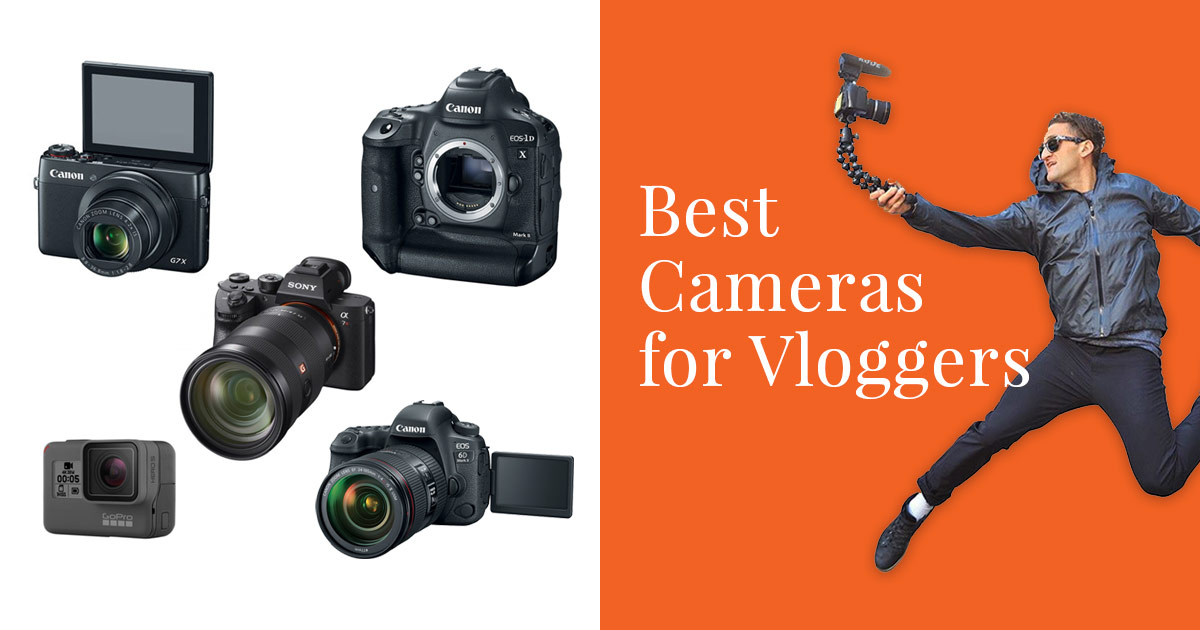
Vlogging Camera Cost by Type
The right price range depends on the type of camera you buy. A webcam may cost less than $100, while a professional mirrorless setup can cost several thousand dollars.
| Camera type | Typical U.S. camera price | Best for |
|---|---|---|
| Smartphone | $0 if you own one; $400–$1,500 for a new phone | Casual vlogs, travel, short videos |
| Webcam | $30–$200 | Desk videos, live streams, online lessons |
| Action camera | $200–$500 | Outdoor, sports, travel, and hands-free video |
| Compact vlogging camera | $300–$1,000 | Simple handheld and travel vlogs |
| Entry-level mirrorless camera | $500–$1,200 | Better image quality and lens choice |
| Mid-range mirrorless camera | $1,000–$2,500 | Serious creators and paid work |
| Professional cinema setup | $2,500 and up | Commercial video and advanced production |
These ranges usually cover the camera body or a basic kit. They may not include sales tax, storage, a microphone, lighting, or a lens upgrade.
Smartphone: the lowest-cost option
A smartphone may be the cheapest vlogging camera because you already own it. Modern phones can record sharp video, stabilize handheld footage, and edit clips without a computer.
Your extra cost may be only:
- $15–$50 for a small tripod
- $30–$150 for a microphone
- $20–$100 for a phone light
- $10–$50 for a phone mount or grip
A phone works well for short videos, family content, travel clips , and social media. Its small sensor may struggle in dark rooms. Built-in microphones also pick up wind and room noise.
Webcam: usually $30 to $200
A webcam suits creators who sit at a desk. It is useful for YouTube live streams, tutorials, gaming, video calls, and online classes.
Low-cost webcams may offer basic 1080p video. More expensive models may provide better exposure control, autofocus, or 4K recording. A webcam is less useful for walking videos because it normally needs a computer and a fixed position.
Action camera: usually $200 to $500
Action cameras are small, tough, and easy to carry. They suit biking, hiking, skiing, water activities, and point-of-view video.
The camera itself may not include all the mounts you need. Budget for a mount, extra battery, protective case, and memory card. An action camera can produce a wide view, but that view may make faces look stretched near the edge of the frame.
Compact vlogging camera: usually $300 to $1,000
Compact cameras are built for simple, portable video. Many include a flip screen, a built-in lens, autofocus, and small controls.
This category often gives a better balance than either a phone or a large camera. It can be easier to use than a mirrorless model. The main limit is that the built-in lens cannot always be replaced or upgraded.
Mirrorless camera: usually $500 to $2,500
Mirrorless cameras use interchangeable lenses. They can offer better low-light video, stronger background blur, larger sensors, and more control.
The price depends on whether the camera includes a lens. A body-only price may look low, but you cannot record useful video without a compatible lens. A basic lens may add $100 to $500, while a high-end lens can cost much more.
Professional cinema equipment: $2,500 and up
Cinema cameras are made for controlled productions. They may provide professional recording formats, detailed color controls, strong cooling, and many connection options.
They are often too large or complex for a new vlogger. A cinema camera can also require a monitor, batteries, media, rig, lens, and external audio. Buy this class of equipment only when your work needs its specific features.
What Does a Complete Vlogging Setup Cost?
A complete beginner setup often costs $500 to $1,000 before sales tax. This includes the camera and the basic tools needed to record clear video and sound.
Here is a sample cost plan:
| Item | Budget setup | More advanced setup |
|---|---|---|
| Camera | $300 | $900 |
| Lens, if needed | Included or $150 | $400 |
| Microphone | $40 | $200 |
| Memory card | $15 | $60 |
| Spare battery | $25 | $80 |
| Small tripod or grip | $25 | $100 |
| Small LED light | $30 | $150 |
| Carrying case | $20 | $80 |
| Estimated total | $455 | $1,970 |
These are example calculations, not quotes for a specific brand or model.
The microphone can matter more than the camera
Viewers may tolerate a soft image. They are less likely to tolerate muffled, noisy, or distant speech.
A basic wired microphone may cost $20 to $60. A compact on-camera microphone may cost $50 to $150. A wireless microphone system can cost $100 to $400 or more.
Check compatibility before buying. Some microphones use a 3.5 mm plug. Others connect through USB-C, Lightning, or a proprietary receiver. A microphone made for a phone may not connect directly to a camera.
Memory cards add a small but required cost
A camera needs storage unless it records to another device. A suitable card often costs $15 to $60.
Do not choose a card by capacity alone. Check the camera manual for:
- Supported card type
- Maximum capacity
- Required speed class
- Recommended video format
- Whether the camera needs a card for high-bitrate recording
A card that is too slow may stop recording or show an error. Format the card in the camera when the manual recommends it.
Lighting changes the result
Good light can make an inexpensive camera look better. A small LED light may cost $30 to $150. A softbox or two-light kit may cost $100 to $400.
For indoor talking videos, place the main light slightly above and in front of your face. Avoid putting a bright window directly behind you. Better light can reduce noise and help autofocus, which may delay the need for a more expensive camera.
A tripod or grip improves stability
A small tripod or hand grip usually costs $20 to $100. Look for a model that can support the weight of the camera and lens.
A phone tripod cannot always hold a mirrorless camera safely. Check the weight limit and mounting screw before use. A loose mount can damage the camera or cause a fall.
What Changes the Price of a Vlogging Camera?
The most important price factors are sensor size, autofocus, lens design, audio support, image stabilization, and recording limits.
Sensor size
A larger sensor can capture more light and create a stronger background blur. Common sensor types include:
- 1/2.3-inch or similar small sensors: common in action cameras and some compact models
- 1-inch sensors: common in premium compact cameras
- Micro Four Thirds: found in some interchangeable-lens cameras
- APS-C: common in mid-range mirrorless cameras
- Full frame: common in advanced and professional cameras
A larger sensor does not automatically make a camera better for every vlog. It can add cost, weight, and lens expense. A small camera may be easier to carry and more likely to be used.
Autofocus
Autofocus helps keep your face sharp while you move. Face and eye detection can be useful for solo creators who cannot check focus during recording.
A camera with strong autofocus often costs more, but autofocus quality depends on the lens, lighting, subject movement, and camera settings. Read the manual for the exact recording mode. Some cameras limit autofocus features at certain frame rates or resolutions.
Image stabilization
Stabilization reduces the appearance of hand shake. It may come from the lens, the camera body, electronic processing, or a combination.
Electronic stabilization can crop the image. That means the camera may show a narrower view than expected. Test stabilization before filming a walking vlog, especially if you use a wide lens.
Lens cost
A camera with interchangeable lenses can become expensive over time. You may want:
- A wide lens for handheld talking videos
- A fast lens for dim rooms
- A telephoto lens for distant subjects
- A compact lens for travel
A kit lens may be enough to begin. Buy another lens only when your current lens creates a clear problem.
Recording limits and heat
Some cameras stop recording after a set time or may become hot during long clips. Limits can vary by resolution, frame rate, room temperature, battery level, and camera settings.
Check the manufacturer’s specifications and support documents for the exact model. Do not assume that a camera advertised as “4K” can record 4K continuously for hours.
Screen design
A flip-out screen helps you frame yourself. This feature is useful for solo vlogging, but it does not guarantee good autofocus or sound.
A tilting screen may work well from behind the camera. A fully articulated screen is more flexible for front-facing work, but it can be easier to block with a microphone or cable.
How Much Should a Beginner Spend on a Vlogging Camera?
Most beginners should plan to spend $400 to $800 on the camera and basic accessories. This range can provide useful video without forcing you to buy professional equipment before you know what you need.
A sensible budget depends on your filming style:
| Your main use | Sensible starting budget |
|---|---|
| Occasional phone videos | $0–$100 in accessories |
| Desk videos and live streams | $80–$300 |
| Travel and daily vlogs | $300–$800 |
| Outdoor and action videos | $250–$700 |
| Film-style talking videos | $700–$1,500 |
| Paid video work | $1,500 and up |
These budgets include broad accessory allowances. Your final cost may be lower during a sale or higher when you need special lenses and audio equipment.
Choose the problem before the camera
Do not start with the most expensive camera. Start with the problem you want to solve.
- If your image shakes, consider a tripod, grip, or stabilization.
- If your voice sounds poor, buy a microphone.
- If your face looks dark, improve the light.
- If the camera loses focus, compare autofocus behavior and settings.
- If the camera is too large, choose a smaller model you will carry.
This approach prevents a common mistake: spending $1,500 on a camera while using poor sound and weak lighting.
Spend more on sound when speech is central
A talking-head channel may gain more from a good microphone than from a jump from 1080p to 4K. A travel channel may value small size and stabilization more than interchangeable lenses.
Match the budget to the content. Product reviews, tutorials, interviews, cooking videos, and travel vlogs each place different demands on the camera.
New or Used: Which Costs Less?
A used vlogging camera can cost 20% to 50% less than a comparable new model, but the real discount depends on condition, age, included accessories, and seller protection.
Used equipment can be a good choice when the model has the features you need. It can be a poor choice when the camera has heavy wear, a weak battery, a damaged screen, or an outdated connection.
Before buying used, check:
- The exact model number and regional version.
- Whether the camera records and plays back video.
- The condition of the lens and sensor area.
- The screen, buttons, ports, card slot, and battery door.
- Included battery, charger, lens cap, and cables.
- The seller’s return policy.
- Whether the camera has a warranty.
- Whether the camera supports your computer and editing software.
Avoid a deal that has no clear photos, no return policy, or no explanation of damage. Used batteries may need replacement, so include that cost in your budget.
Manufacturer-certified or reputable used retailers may cost more than private sales. In return, they may provide inspection and a return period. Read the terms before paying.
Hidden Costs to Include in Your Budget
The advertised camera price is rarely the final amount you pay. U.S. buyers should also consider sales tax, shipping, storage, power, editing, and replacement costs.
Sales tax
Sales tax varies by state and local area. For example, a camera priced at $700 will cost more at checkout in a location that charges sales tax.
Use this simple estimate:
Final price = listed price + shipping + sales tax
A camera listed at $700 with an estimated 8% tax would cost about $756 before shipping. The exact amount depends on the seller and delivery address.
Editing software
Free tools can handle basic cuts, captions, and exports. Paid software may use a one-time purchase or a monthly plan.
Check whether the software supports:
- Your camera’s video format
- Your computer’s operating system
- 4K files, if you use them
- External microphones and separate audio
- The type of captions and exports you need
Do not pay for a plan until you know which features your videos require.
Storage and backup
Video files can fill a drive quickly. You may need an external drive for project files and backups.
A practical backup plan keeps at least one additional copy of important videos. Cloud storage may add a monthly cost. A local drive may cost less over time but can fail or be lost.
Batteries and charging
A spare battery may cost $25 to $100. Some cameras support USB charging or power banks, while others need a dedicated charger.
Check the camera manual before using a third-party battery or power supply. Poorly matched power equipment can cause charging problems or unexpected shutdowns.
Travel and protection
Travel vloggers may need a case, rain cover, lens filter, or extra mounts. These items may add $30 to $200.
Do not treat a camera as waterproof unless the manufacturer states the conditions clearly. “Weather resistant” does not always mean safe in rain, snow, dust, or salt water.
How to Compare Vlogging Cameras at the Same Price
Compare cameras by useful features, not by resolution alone. Two cameras may both record 4K but differ greatly in sound, focus, battery life, size, and heat control.
Use this checklist:
1. Confirm the type of video you make
Ask whether you record:
- Yourself while walking
- Yourself at a desk
- Family or travel events
- Sports and outdoor activity
- Interviews
- Product demonstrations
- Live streams
The answer affects the value of stabilization, autofocus, lens range, and audio ports.
2. Check the total system cost
Compare the camera, lens, microphone, card, battery, and support. A $600 camera with a $400 lens may cost more than a $900 camera with a useful kit lens.
3. Check the audio connection
If you plan to use a wired microphone, confirm that the camera has the right input. Some small cameras do not have a microphone jack.
4. Check the screen and controls
Make sure the screen position suits your filming style. A front-facing screen is useful when you record alone, but it is only one part of the setup.
5. Read the manual before buying
The product page may list the best possible resolution. The manual can reveal recording limits, crop factors, card requirements, power limits, and compatibility details.
Official support pages from brands such as Sony, Canon, Nikon, GoPro, and DJI are useful places to check documented specifications. Specifications are not the same as independent testing, so treat them as a starting point.
Common Vlogging Camera Buying Mistakes
The most costly mistake is buying equipment for a type of video you do not make. A large camera may produce excellent footage but stay at home because it is heavy.
Avoid these errors:
- Choosing 4K without checking storage and computer power.
- Buying a body-only camera without budgeting for a lens.
- Ignoring the microphone connection.
- Assuming a kit includes a memory card.
- Buying a very wide lens that distorts faces.
- Forgetting sales tax and accessories.
- Using a slow or unsupported memory card.
- Paying for features you cannot use.
- Trusting a high megapixel count to predict video quality.
- Skipping the return policy.
A camera should fit your hands, bag, computer, and filming habits. A smaller camera that you use every week can be more valuable than a costly model that is difficult to carry.
Frequently Asked Questions
Is $300 enough for a vlogging camera?
Yes, $300 can be enough for an action camera, basic compact camera, used interchangeable-lens camera, or a phone-based setup. You may need to spend extra on a microphone, memory card, and tripod.
Is a $1,000 camera worth it for vlogging?
It can be worth it if you need better autofocus, low-light performance, stabilization, lens choice, or reliable audio connections. It may not be worth it if your main problem is poor lighting or sound.
Is a phone better than a cheap vlogging camera?
A phone may be better than a very cheap camera because it offers simple autofocus, editing apps, stabilization, and easy sharing. A dedicated camera becomes more useful when you need optical zoom, stronger background blur, longer battery life, physical controls, or a specific lens.
Do I need a 4K camera to start vlogging?
No. A 1080p camera can produce clear videos for many platforms. 4K gives you more detail and room to crop, but it also creates larger files and may require more storage and computer power.
How much does a microphone for a vlogging camera cost?
A basic microphone costs about $20 to $60. A better on-camera microphone often costs $50 to $150. Wireless microphone systems commonly range from $100 to $400 or more.
Should I buy a camera with a flip screen?
A flip screen is useful when you record yourself because it helps you check framing. It does not replace good autofocus, lighting, or audio. Confirm that the screen can remain visible with your microphone and tripod attached.
Conclusion: A Realistic U.S. Vlogging Camera Budget
For most new creators in the United States, a realistic starting budget is $400 to $800 for a camera and basic accessories. A phone can reduce that cost, while a full mirrorless system can raise it to $1,000 to $2,500 or more.
Buy for your filming problem, not for the biggest specification list. Prioritize clear sound, steady framing, useful lighting, and a camera that you will carry and use. Before checkout, add the lens, microphone, card, battery, tripod, tax, and any software to calculate the true cost.
Recent Posts
Compare eight travel crossbody bags for water protection, organization, comfort, and security. Get practical buying advice and find the right bag for your next trip.
How much is a good vlogging camera? Explore realistic price ranges, key features, and budget-friendly options to find the right camera for your needs.