
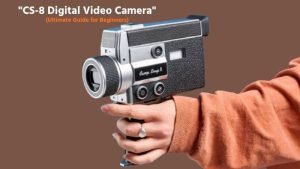
In today’s content-driven world, having a reliable video camera is essential for creators, vloggers, and everyday users who want to capture high-quality footage without complicated setups. The CS-8 Digital Video Camera is designed to meet this need by offering a simple, affordable, and user-friendly solution for recording videos and capturing moments on the go.
Whether you’re just starting your journey into video creation or looking for a budget-friendly alternative to professional cameras, the CS-8 stands out as a practical option. One of the key advantages of the CS-8 Digital Video Camera is its compact design and ease of use.
Unlike bulky professional equipment, this camera is lightweight and portable, making it ideal for travel, vlogging, family events, and casual filmmaking. It typically includes features like HD video recording, digital zoom, built-in microphone, and basic stabilization, allowing users to produce decent-quality videos without technical expertise.
In this guide, we’ll explore everything you need to know about the CS-8 digital video camera, from its features and specifications to performance, pros and cons, and real-world usability so you can decide whether it’s the right camera for your needs.
CS-8 Digital Video Camera Full Specifications
The CS-8 Digital Video Camera (often known as the Camp Snap CS-8) is a retro-inspired digital camcorder designed for simple, creative video recording rather than professional filmmaking. Unlike modern cameras packed with advanced features, the CS-8 focuses on minimalism, nostalgia, and ease of use, making it unique in today’s market.
Video Resolution & Recording Quality
The CS-8 video camera typically supports Full HD 1080p video recording at 30 frames per second, allowing users to capture clear and smooth footage. Some versions may also offer lower resolutions like 720p for saving storage space. While it does not support 4K recording, the video quality is sufficient for YouTube, social media, and personal use.
Image Sensor & Photo Capability
This camera is equipped with a CMOS image sensor, commonly found in budget camcorders. It can capture still images along with video, usually ranging between 12MP to 24MP (interpolated). While the photo quality is basic, it is good enough for casual snapshots.
Zoom Function (Digital Zoom)
The CS-8 camera offers digital zoom (often up to 16x or more), allowing users to zoom in on distant subjects. However, since it is not optical zoom, image quality may decrease when zooming in heavily.
Display Screen
Most CS-8 models come with a 2.7-inch to 3-inch LCD screen, often with a rotatable or flip-out design. This makes it easier for users to frame shots, record themselves, and shoot from different angles, which is especially useful for vlogging.
Audio Recording & Microphone
The camera includes a built-in microphone for recording audio along with video. While it captures sound adequately for casual use, it may pick up background noise, and external microphone support is usually limited or unavailable.
LED Light / Night Mode
Some versions of the CS-8 camcorder include a built-in LED light or basic night vision mode, which helps in low-light recording. However, performance in very dark conditions is still limited.
Battery & Power Backup
The CS-8 uses a rechargeable lithium battery, offering around 60–120 minutes of recording time depending on usage. This makes it suitable for short recording sessions, but extra batteries may be needed for extended use.
Storage & Memory Support
The camera supports SD or microSD memory cards (usually up to 32GB or 64GB). This allows users to store videos and photos easily, and cards can be swapped for additional storage.
Connectivity Options
The CS-8 video camera typically includes USB connectivity for file transfer and charging. Some models may also support HDMI output, allowing you to connect the camera to a TV or monitor for playback.
Design, Size & Build
This camcorder features a compact and lightweight plastic body, making it easy to carry and handle. The ergonomic grip and simple button layout make it comfortable for beginners to use.
The CS-8 Digital Video Camera offers a solid set of basic specifications for entry-level users. While it lacks advanced features like 4K recording, optical zoom, or professional audio input, it remains a good option for those who want a simple, affordable, and easy-to-use camcorder for everyday video recording.
CS-8 Digital Video Camera Details
The CS-8 Digital Video Camera is not a typical modern camcorder; it’s a retro-inspired, screen-free video camera designed to deliver a unique and nostalgic filming experience. Inspired by classic Super 8 film cameras, it focuses more on creativity and simplicity rather than high-end technical performance. This makes it especially so among content creators, vloggers, and users who want a different, cinematic feel in their videos.
Unique Retro Concept & Purpose
The CS-8 stands out because it is built around a “shoot now, watch later” philosophy. It has no playback screen, meaning you cannot preview or delete videos instantly. This encourages users to stay focused on capturing moments instead of constantly reviewing footage.
Video Quality & Recording Experience
Unlike traditional cameras focused on sharpness, the CS-8 records in up to 2.7K video resolution, delivering a slightly retro, cinematic look rather than ultra-clear modern footage. This makes it ideal for creative storytelling, short films, and nostalgic-style videos.
Digital Zoom Capability
The camera includes up to 8x digital zoom, allowing users to get closer to subjects. However, since it’s digital (not optical), video quality may decrease when zoomed in heavily.
Film-Style Filters & Creative Modes
One of the most interesting features is its built-in film-style filters, including vintage, analog, black & white, and standard modes. These filters help recreate the look of old film cameras and give videos a unique aesthetic.
Multiple Aspect Ratios
The CS-8 supports various aspect ratios such as 16:9 (widescreen), 9:16 (vertical), 1:1 (square), and 4:3 (classic). This flexibility makes it perfect for creating content for platforms like YouTube, Instagram, and TikTok.
Audio Recording Features
The camera includes a built-in microphone for capturing audio along with video. Some versions also support external microphone input, which improves audio quality for better recordings.
Storage & Recording Capacity
It uses microSD cards (up to 128GB) and often comes with a 4GB card included, which can store around 30 minutes of footage. With higher-capacity cards, users can record several hours of video.
Battery & Charging System
The CS-8 features a rechargeable battery with USB-C charging, offering convenient and modern power support. It typically provides around 30–60 minutes of recording time, depending on usage.
Design & Handling
This camera has a distinctive pistol-grip design with a trigger button, making recording simple—just press to start and release to stop. It also includes analog-style dials for battery and memory indicators, enhancing the retro feel.
CS-8 Digital Video Camera Performance Review
The CS-8 Digital Video Camera delivers a very different kind of performance compared to traditional camcorders. Instead of focusing on high-end video quality and advanced features, it prioritizes creativity, simplicity, and a nostalgic shooting experience. Designed as a retro-inspired device, its performance should be judged not only by technical standards but also by how it feels to use.
Video Quality Performance
The CS-8 records video in up to 2.7K resolution at 30fps, which is decent for a budget camera and suitable for social media content. In standard mode, videos look fairly clear with good colors, but they are not as sharp as modern 4K cameras. The camera is intentionally designed to produce a slightly soft and retro look, especially when using its analog filters.
Retro Effect & Creative Output
One of the strongest aspects of the CS-8 is its retro-style performance. It includes film-like filters that add grain, scratches, and faded colors, mimicking old Super 8 footage. This makes the camera ideal for storytelling, cinematic clips, and creative projects where style matters more than clarity.
Zoom Performance
The camera offers 8x digital zoom, but performance drops significantly when zooming in. Since it is not optical zoom, footage becomes pixelated and less usable at high zoom levels. For best results, it is recommended to shoot without zoom or use minimal zoom.
Stability & Motion Handling
One major limitation is the lack of image stabilization. As a result, handheld footage can appear shaky, especially movement or walking shots. This means users need steady hands or external support like a tripod for smoother videos.
Audio Performance
The built-in microphone performs reasonably well for close-range audio, capturing voices clearly when the subject is near. However, distant sounds are weaker, and background noise or wind can affect quality. For professional audio needs, this camera may feel limited.
Ease of Use & Shooting Experience
Performance is not just about output; it’s also about usability. The CS-8 excels here with its simple controls, trigger-based recording, and minimal settings. The “press-to-record” trigger system encourages short, spontaneous clips, making the camera fun and intuitive to use.
Low-Light Performance
Due to its small sensor, the CS-8 struggles in low-light conditions. Bright areas may become overexposed, while darker scenes can appear noisy. It performs best in daylight or well-lit environments.
Battery & Recording Performance
The camera provides around 30–60 minutes of recording time, depending on usage. This is acceptable for short clips and casual shooting but not ideal for long continuous recordings.
Overall Performance Experience
What truly defines the CS-8 is its experience-driven performance. It is not built to compete with professional cameras but to offer a fun, distraction-free, and nostalgic way of filming. The lack of screen and instant playback helps users stay in the moment, which many reviewers consider a unique advantage.
The CS-8 Digital Video Camera offers a unique performance focused on creativity rather than technical perfection. It’s best for users who want a fun, nostalgic, and simple video recording experience rather than high-quality cinematic production. If your goal is storytelling, casual content, or artistic videos, the CS-8 performs well, but for professional or high-resolution needs, it falls short.
CS-8 digital video Battery Life and Charging Time Review
When choosing a budget-friendly camcorder like the CS-8 Digital Video Camera, battery life and charging performance are crucial factors, especially for users who plan to shoot videos on the go. Since this camera is designed for casual recording, vlogging, and creative projects, its power performance is built to support short and spontaneous shooting sessions rather than long professional use.
Battery Capacity & Type
The CS-8 digital video camera comes with a built-in rechargeable lithium-ion battery, which is standard for compact camcorders. This type of battery is lightweight and efficient, making it suitable for portable devices. However, it is not very large in capacity, as the camera is designed for short creative clips rather than extended recording sessions.
Battery Life Performance
On average, the CS-8 provides around 30 to 60 minutes of continuous video recording, depending on usage conditions such as resolution, lighting, and zoom. For casual users, this is enough to capture short videos, vlogs, or daily moments. However, for longer shoots, the battery may feel limited, and frequent recharging will be necessary.
Real-World Usage Experience
In real-world use, the battery performs best when recording short clips instead of long continuous videos. The camera’s “trigger-based recording” style naturally supports this, helping conserve battery life. Users who shoot in short bursts will find the battery performance more manageable and efficient.
Charging Time
The CS-8 camera typically takes around 1.5 to 2.5 hours to fully charge using a USB-C cable. This is relatively fast for a compact device and allows users to quickly recharge between sessions. Charging can be done via a power bank, laptop, or wall adapter, adding convenience for travel.
Charging Convenience & Portability
One of the advantages of the CS-8 is its USB-C charging support, which is widely available and easy to use. This means you don’t need a special charger; any standard USB-C cable can work. It’s especially useful for travelers who want a simple and universal charging solution.
Battery Efficiency & Limitations
Battery performance can vary based on conditions. Recording in higher resolution, using zoom frequently, or shooting in low light may drain the battery faster. Also, since the battery is built-in, you cannot easily swap it out, which may be a limitation for heavy users.
Tips to Improve Battery Life
To get the most out of your CS-8 camera battery:
- Record in shorter clips instead of long sessions
- Avoid excessive zoom usage
- Turn off the camera when not in use
- Fully charge before shooting
- Use a power bank for backup charging
CS-8 Digital Video Camera Pros and Cons
The CS-8 Digital Video Camera is a unique device that blends modern digital recording with a retro-inspired shooting experience. Unlike traditional camcorders, it focuses more on creativity and nostalgia rather than high-end performance. Before deciding whether it’s the right camera for you, it’s important to understand its strengths and limitations.
- Pros of CS-8 Digital Video Camera
- Unique Retro Shooting Experience: One of the biggest advantages of the CS-8 is its Super 8–inspired design and shooting style. It removes distractions like screens and playback, allowing users to focus on capturing moments naturally.
- Creative Film-Style Filters: The camera includes built-in vintage filters such as analog, black & white, and retro color tones. These effects give videos a cinematic, old-school look without needing editing software, making it ideal for creative storytelling.
- Simple and Beginner-Friendly Controls: With its trigger-based recording system and minimal buttons, the CS-8 is extremely easy to use. Anyone can pick it up and start recording instantly, making it perfect for beginners and casual users.
- Decent 2.7K Video Quality for Casual Use: The camera records in 2.7K resolution at around 30 fps, which is מספיק for social media and personal videos. While not professional-grade, it still delivers usable and visually appealing footage.
- Multiple Aspect Ratios for Social Media: It supports 16:9, 9:16, 1:1, and 4:3 formats, allowing users to create content for platforms like YouTube, TikTok, and Instagram without extra cropping.
- Lightweight and Portable Design: The camera is compact and easy to carry, making it suitable for travel, daily use, and spontaneous shooting.
- USB-C Charging Convenience: It uses USB-C charging, which is modern, fast, and convenient. You can charge it using power banks, laptops, or adapters, making it travel-friendly.
- Cons of CS-8 Digital Video Camera
- No Screen or Playback Option: The camera has no display screen, meaning you cannot preview or delete videos instantly. While this adds to the retro charm, it can be frustrating for users who prefer control over their recordings.
- No Image Stabilization: The CS-8 lacks any form of stabilization, so handheld footage can appear shaky, especially when walking or moving.
- Digital Zoom Reduces Quality: It only offers 8x digital zoom, which significantly reduces video quality when zoomed in. At maximum zoom, footage can become pixelated and less usable.
- Limited Features and No Connectivity: The camera lacks many modern features such as Wi-Fi, Bluetooth, advanced autofocus, or mobile app support, making it less versatile.
- Weak Low-Light Performance: Due to its small sensor, the CS-8 struggles in low-light conditions, producing grainy and less detailed videos.
- Short Battery Life: Battery performance is limited, typically offering 30–60 minutes of recording time, which may not be enough for long shoots.
The CS-8 Digital Video Camera is not about technical perfection; it’s about fun, creativity, and nostalgia. It’s perfect for users who want a simple, distraction-free way to capture memories with a vintage feel. However, if you need sharp video quality, stabilization, and modern features, this camera may feel limited.
CS-8 Digital Video Camera Troubleshooting and Common Issues
The CS-8 Digital Video Camera is a simple, retro-style camcorder built for easy and creative video recording. While its minimalist design makes it beginner-friendly, it can also lead to a few common technical issues, especially since it lacks advanced features like a screen or complex diagnostics. The good news is that most problems are easy to fix with basic troubleshooting.
Camera Not Turning On
If your CS-8 camera doesn’t power on, the most common cause is a drained or faulty battery. Make sure the battery is fully charged using the USB-C cable. If it still doesn’t turn on, try a different charging cable or adapter, and check for any dirt or damage in the charging port.
Battery Draining Too Fast
Short battery life (around 30–45 minutes) is normal, but if it drains unusually fast, it could be due to continuous recording, high brightness usage (if applicable), or an aging battery. To fix this, limit long recordings, turn off the camera when not in use, and consider replacing the battery if performance has degraded.
Memory Card Not Detected
If the camera doesn’t recognize your microSD card, it may be due to incompatibility, improper insertion, or formatting issues. Make sure you’re using a supported card (usually up to 128GB), reinsert it properly, and format the card using a computer if needed.
Video Not Recording Properly
If videos are not being saved or recording stops suddenly, check if the memory card is full or corrupted. Free up space or replace the card. Also, ensure the battery has enough charge before starting recording.
Cannot Play or View Videos
Since the CS-8 has no display screen, you can’t view videos directly on the device. If videos don’t play on your computer, the issue could be unsupported file format or corrupted files. Try using a different media player or transferring the files again.
Blurry or Low-Quality Footage
Blurry videos are often caused by camera shake, poor lighting, or excessive digital zoom. To fix this, hold the camera steady, shoot in good lighting, and avoid zooming too much. Cleaning the lens can also improve clarity.
Shaky or Unstable Video
The CS-8 does not include image stabilization, so shaky footage is common. Use a tripod, stabilizer, or firm grip to reduce movement and improve video quality.
Poor Audio Quality
If your audio sounds unclear or noisy, it’s likely due to the basic built-in microphone. Try recording in a quiet environment or use an external microphone if your model supports it.
Buttons Not Responding
If the camera buttons don’t respond, it could be due to dust, internal wear, or minor software glitches. Restart the camera and gently clean around the buttons. If the issue continues, it may require professional servicing.
The CS-8 Digital Video Camera may have a few common issues like battery limitations, storage errors, and lack of stabilization, but most of these are easy to fix with simple troubleshooting steps.
How to Use CS-8 Digital Video Camera
The CS-8 Digital Video Camera is designed for simple, creative, and hassle-free videography. Unlike modern cameras filled with complex menus, the CS-8 focuses on a minimalist, retro shooting experience, making it ideal for beginners. If you’re new to this camera, follow this easy step-by-step guide to start recording videos quickly and effectively.
Charge the Camera Fully Before Use: Before you start, make sure the camera is fully charged using the USB-C cable. A full charge typically provides 30–45 minutes of recording time, so it’s important to begin with enough battery for your session.
Insert a microSD Card Properly: The CS-8 requires a microSD card (up to 128GB) to store videos. Insert the card into the slot until it clicks into place. Without a memory card, the camera will not record footage.
Power On the Camera: Turn on the camera using the power button or switch. Since there is no display screen, you may see a small indicator light showing that the camera is active.
Start Recording Video: To begin recording, press or hold the record trigger/button. The camera will start capturing video immediately. Release the button to stop recording. Each recording creates a separate video clip, which is useful for editing later.
Use Zoom Carefully: The CS-8 offers digital zoom controlled by buttons or a dial. Use it sparingly because too much zoom can reduce video quality. For better results, try moving closer to your subject instead.
Switch Between Filters and Modes: You can change the camera’s look using its built-in filters. Use the mode dial or button to select your preferred style before recording.
Choose the Right Aspect Ratio: Some CS-8 models allow switching between aspect ratios like 16:9, 4:3, or vertical (9:16). Choose the format based on where you plan to share your videos (YouTube, Instagram, TikTok, etc.).
Hold the Camera Steady While Shooting: Since the CS-8 does not have image stabilization, it’s important to hold it steady with both hands or use a tripod. This helps avoid shaky footage and improves video quality.
Record in a Quiet Environment for Better Audio: The built-in microphone is basic, so try to film in quiet places to reduce background noise. If your model supports it, you can also use an external microphone for clearer sound.
Transfer and View Your Videos: Because the camera has no screen, you’ll need to connect it to a computer via USB-C or remove the microSD card to view your videos. You can then edit, share, or store your footage.
Using the CS-8 Digital Video Camera is all about simplicity and creativity. With just a few basic steps, you can start recording unique, retro-style videos. The more you practice, the better your framing, storytelling, and shooting skills will become.
Is the CS-8 Digital video camera good for beginners?
The CS-8 Digital Video Camera can be a good option for beginners but only if you understand what it’s designed for. This camera focuses more on simplicity and creativity rather than advanced features, making it easy for new users to start recording without any technical knowledge. With its minimal controls and trigger-based recording system, beginners can simply press a button and start capturing videos instantly, without worrying about complicated settings like exposure, focus, or frame rates.
One of the biggest advantages for beginners is its distraction-free experience. Unlike modern cameras, the CS-8 does not include a screen for instant playback, which encourages users to stay focused on the moment and develop a more natural filming style. This can be especially helpful for those who want to learn storytelling, vlogging, or creative shooting without constantly checking their footage.
However, it’s important to note that the CS-8 is not a traditional learning tool for videography. It lacks features like image stabilization, advanced controls, and high-end video quality, which means beginners won’t be able to learn technical skills in depth. It also has limited battery life and weaker performance in low light, which may be a drawback for some users.
Overall, the CS-8 Digital Video Camera is a great beginner-friendly choice for casual use, creative projects, and fun video recording. But if your goal is to learn professional videography or create high-quality content, you may eventually need a more advanced camera.
FAQs
Does the CS-8 Digital Video Camera support Wi-Fi or Bluetooth?
No, the CS-8 does not support Wi-Fi or Bluetooth, so you cannot directly transfer files wirelessly to a smartphone.
Can I use the CS-8 camera for YouTube videos?
Yes, you can use it for YouTube or social media content, especially if you prefer a retro or creative video style rather than professional-quality footage.
Is the CS-8 camera waterproof or shockproof?
No, the CS-8 is not waterproof or shockproof, so it should be handled carefully to avoid damage.
What makes the CS-8 camera different from smartphones?
Unlike smartphones, the CS-8 focuses on a nostalgic shooting experience without a screen, encouraging users to record more naturally and creatively.
Does the CS-8 camera have image stabilization?
No, it does not have advanced stabilization, so videos may appear shaky if you move while recording.
Can I use an external microphone with the CS-8?
Most versions do not support external microphones, so audio is recorded through the built-in mic only.
How much storage does the CS-8 support?
It usually supports microSD cards up to 64GB or 128GB, depending on the model and firmware.
Is the CS-8 camera suitable for professional videography?
No, it is not designed for professional use. It is best for casual recording, creative projects, and fun videos.
Does the CS-8 camera work in low light?
Low-light performance is limited, so videos may appear grainy or dark in poor lighting conditions.
What is the main purpose of the CS-8 camera?
The main purpose is to provide a simple, distraction-free, and nostalgic video recording experience rather than high-end technical performance.
Conclusion
The CS-8 Digital Video Camera stands out as a unique and creative alternative to modern, feature-heavy cameras. Instead of focusing on advanced technology, it delivers a simple, retro-inspired filming experience that encourages users to concentrate on storytelling, composition, and creativity. Its lightweight design, easy controls, and built-in film-style filters make it especially appealing for beginners, vloggers, and casual content creators.
While the CS-8 may lack features like image stabilization, high-end video quality, and a display screen, these limitations are part of its charm. It promotes a “shoot first, review later” approach, helping users stay present in the moment and develop their creative instincts without distractions. For those who value nostalgia, simplicity, and artistic expression, this camera offers a refreshing way to capture memories.
The CS-8 Digital Video Camera is not about perfection; it’s about creativity and fun. If you’re looking for an easy-to-use camera that delivers a distinctive retro vibe and a hands-on filming experience, the CS-8 is definitely worth considering.
Recent Posts
Parts of a 35mm Camera: Complete Guide to Every Key Part and Its Function
Learn the parts of a 35mm camera, what each part does, and how the lens, shutter, film chamber, viewfinder, and controls work together.
Parts of a Camera Canon: A Complete Guide to Canon Camera Parts and Functions
Learn the parts of a Canon camera, what each part does, and how the lens, sensor, shutter, controls, viewfinder, and screen work together.